Hi, I'm Ivan I love taking complicated products and making them feel simple for the people who use them every day.

For 10+ years I’ve designed side by side with turbine engineers, solar crews on sites with no signal and drivers paying at a pump, for Siemens Gamesa, Volkswagen Group and Terabase Energy. I was a journalist first, so I still start by listening. These days I prototype with AI, so a good idea becomes something you can click through the same week.

  • Based in Belgrade, working globally
  • Ex-journalist
  • Vibe codes with Claude
  • Writes songs on the side
Available for new projects

Clients and partners

  • Siemens Gamesa
  • Volkswagen Group
  • Terabase Energy
  • Apple
  • LogPay
  • HTEC Group
  • P3 Group
  • Feature Works

Apple work was done as a third-party contractor, under NDA.

Client work

Redesigns of the original work, rebuilt with sample data, because the originals are under NDA. I’m happy to walk through the real work in a call.

Siemens Gamesa · AEP Explorer

Showing wind operators where energy is lost, in seconds

Product Designer via HTEC · 2023 · 12 months

EnergyEnterprise SaaSData viz
Read case study
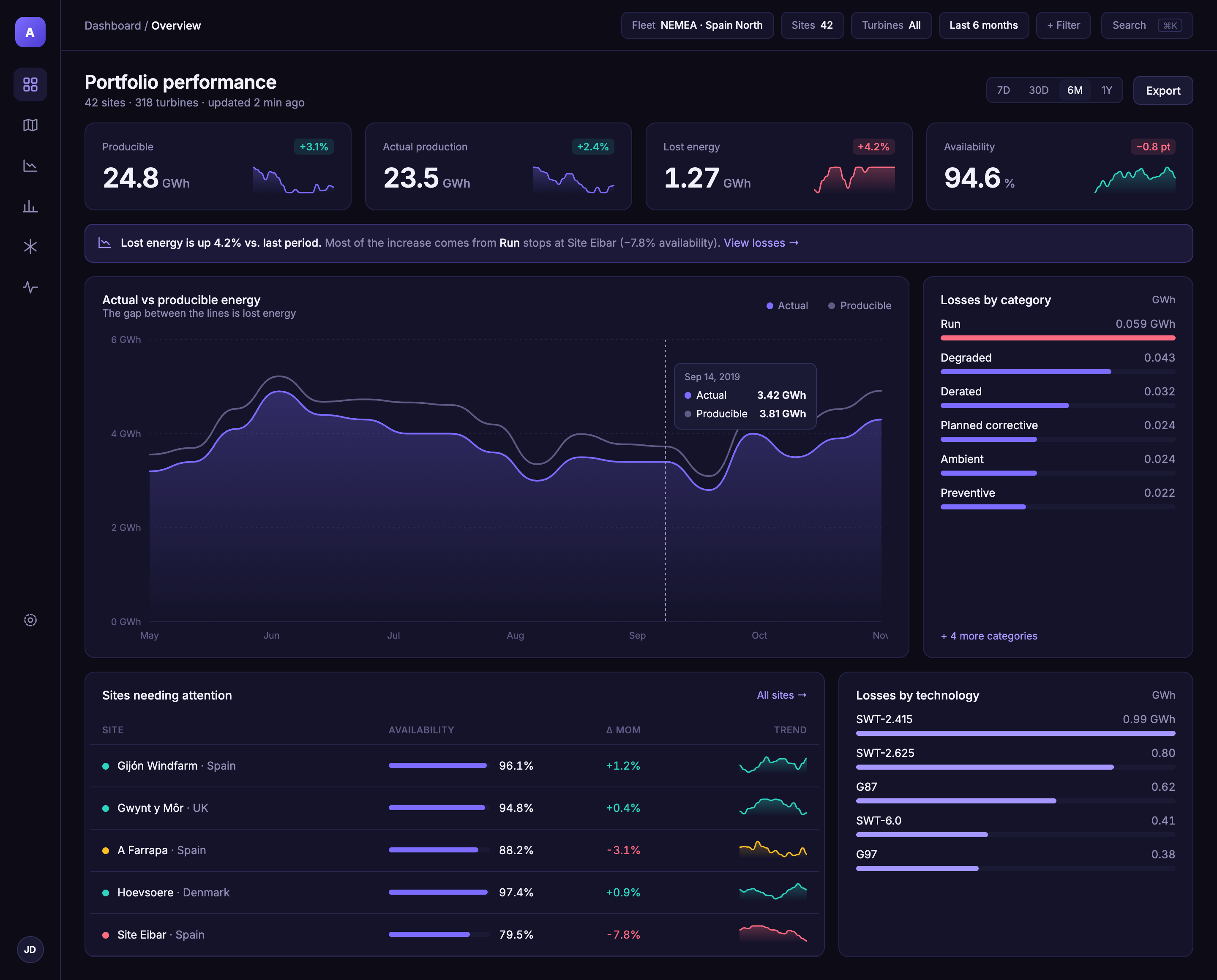
AEP Explorer portfolio overview: KPI cards, actual vs producible energy chart, losses by category and sites needing attention
Volkswagen Group fleet · LogPay

Fuel and EV charging in one app: find it, pay for it, track it

Lead Designer, P3 Group · 2020–21 · 12 months

MobilityFintechiOS
Read case study
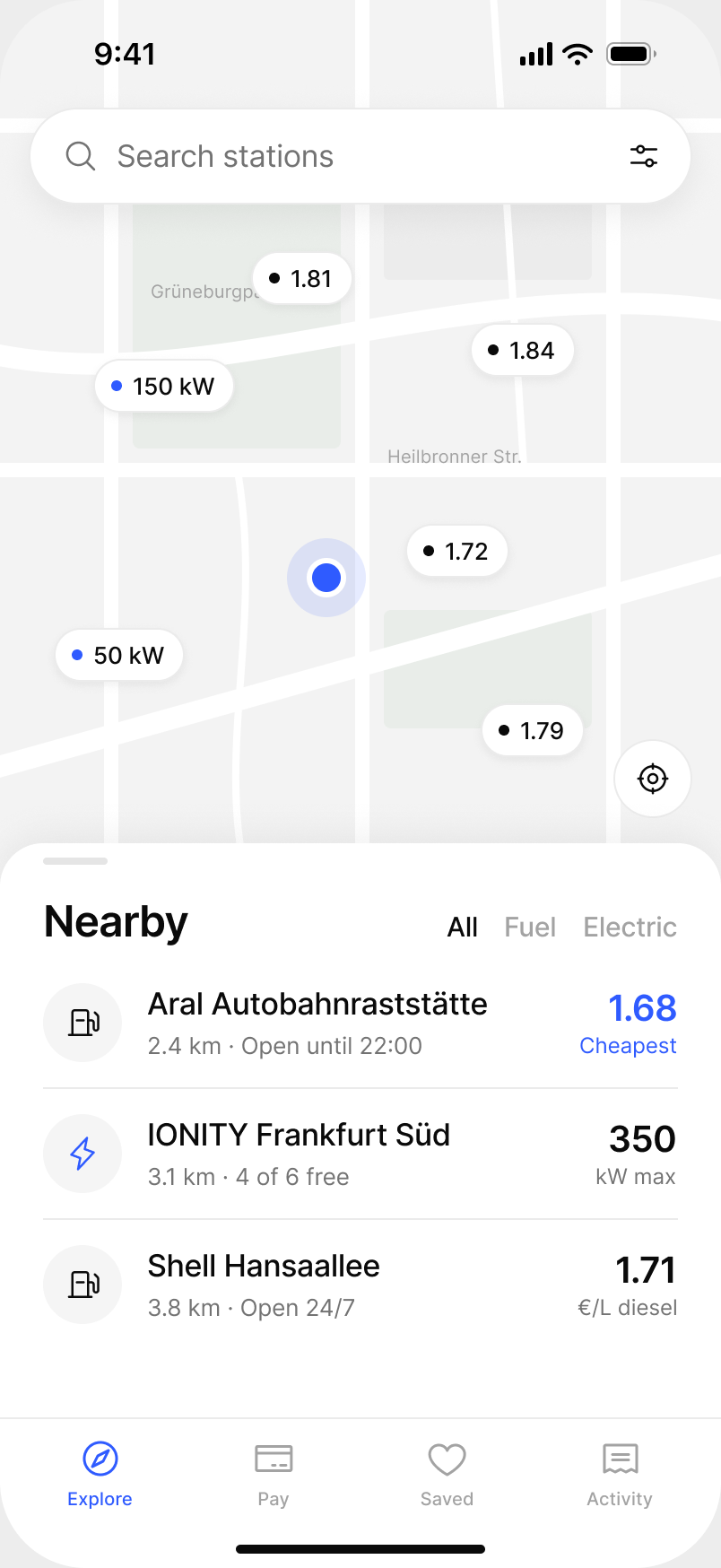
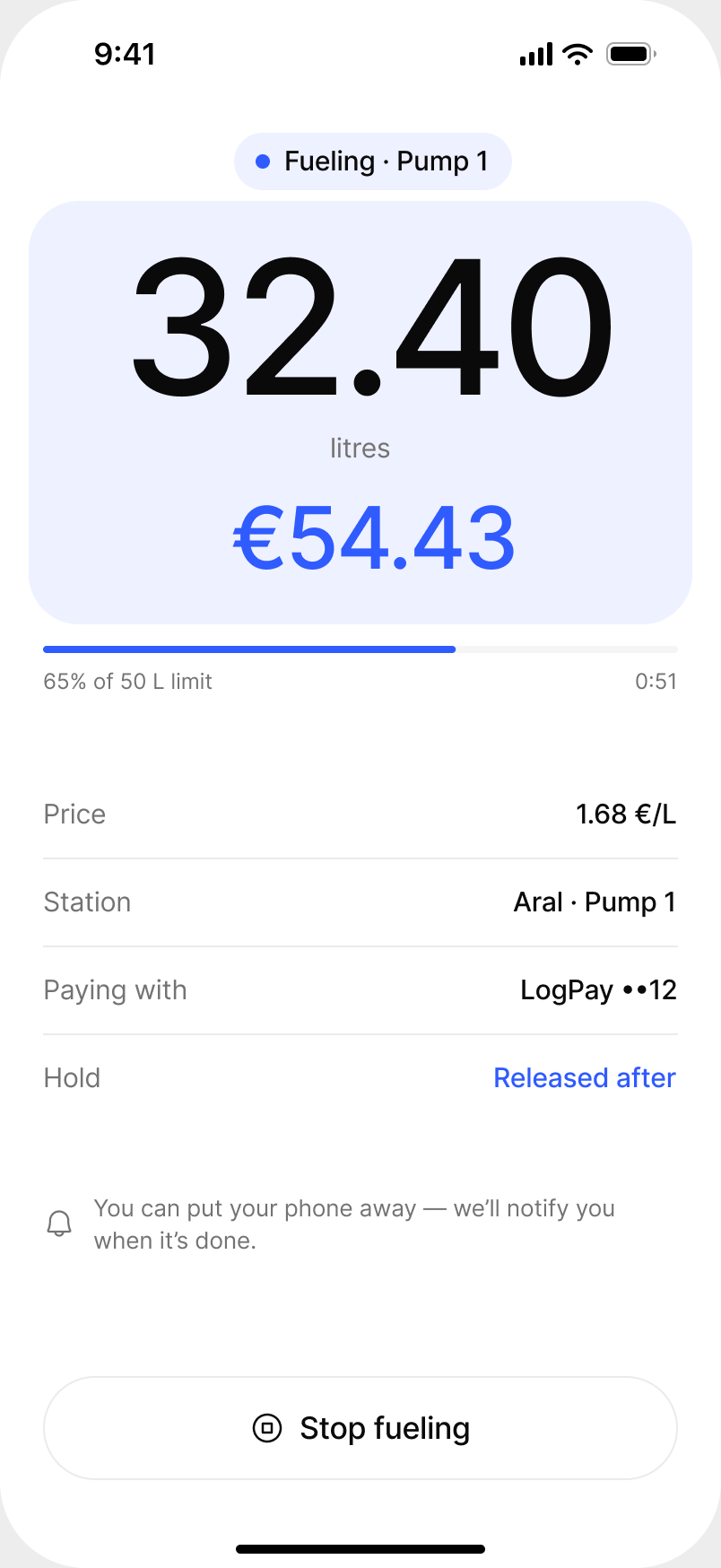
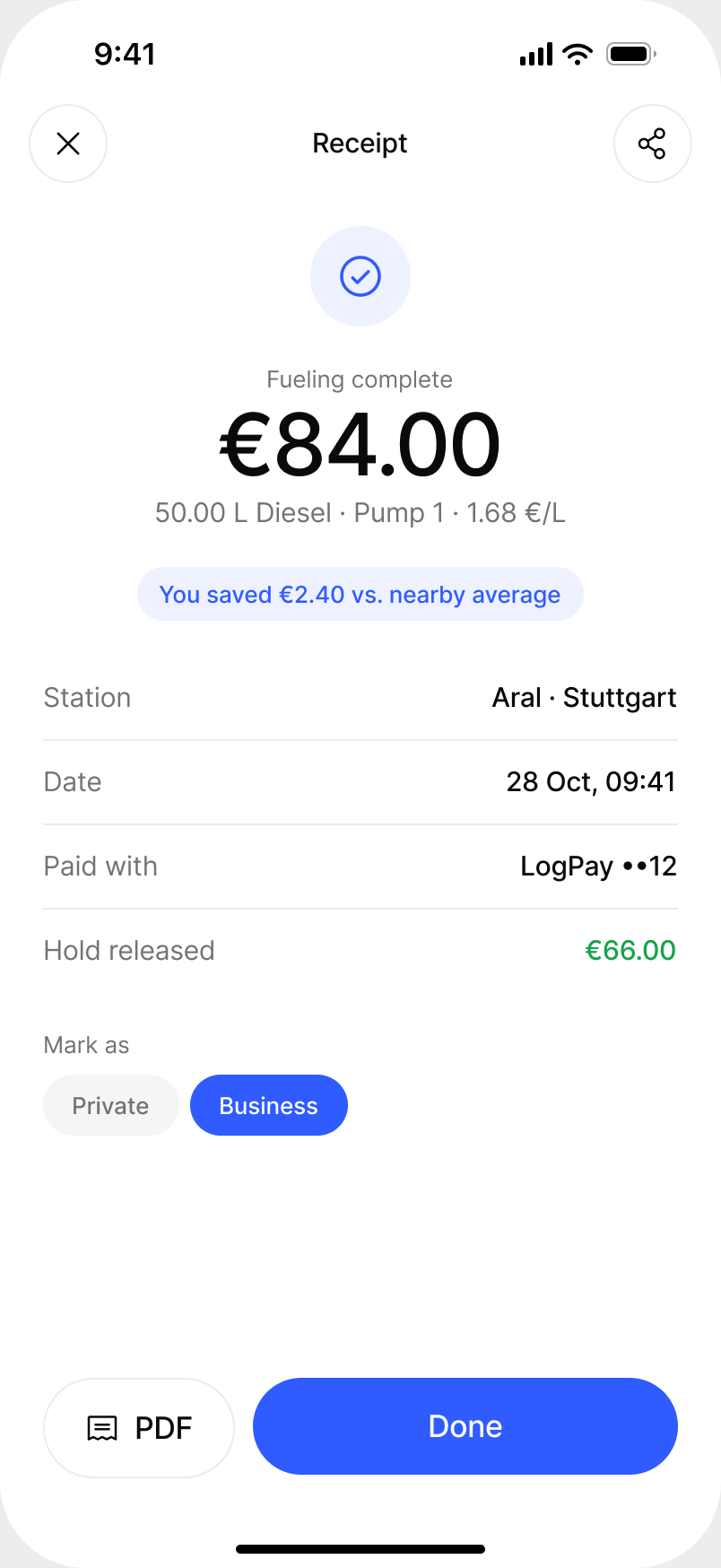
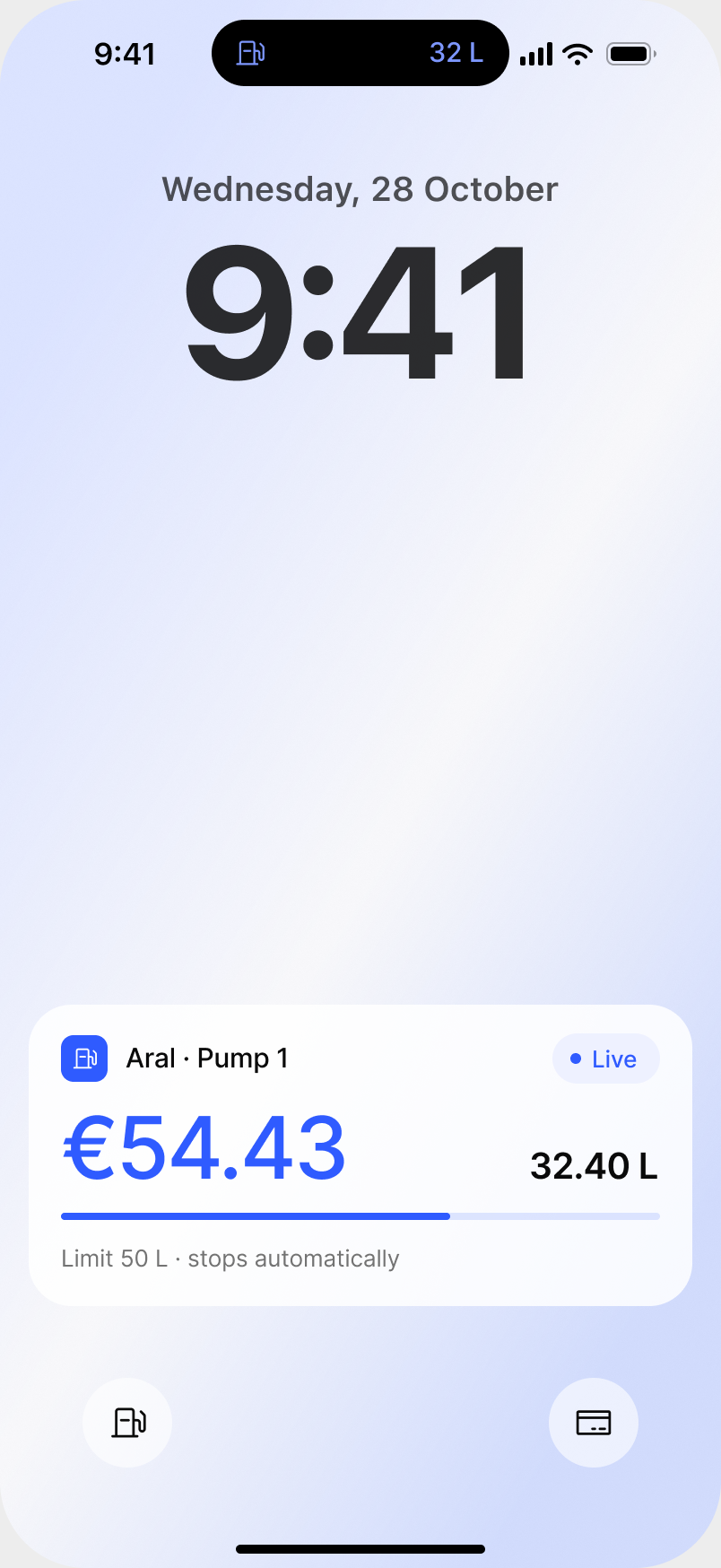
Map of nearby fuel and charging stations with prices and charging speeds Live fueling screen showing 32.4 litres and €54.43 Fueling receipt
Terabase Energy · QC Inspector

From a four-minute paper form to 45 seconds on a tablet, offline

Design lead via HTEC · 2021 · 7 months

SolarField appTablet
Read case study
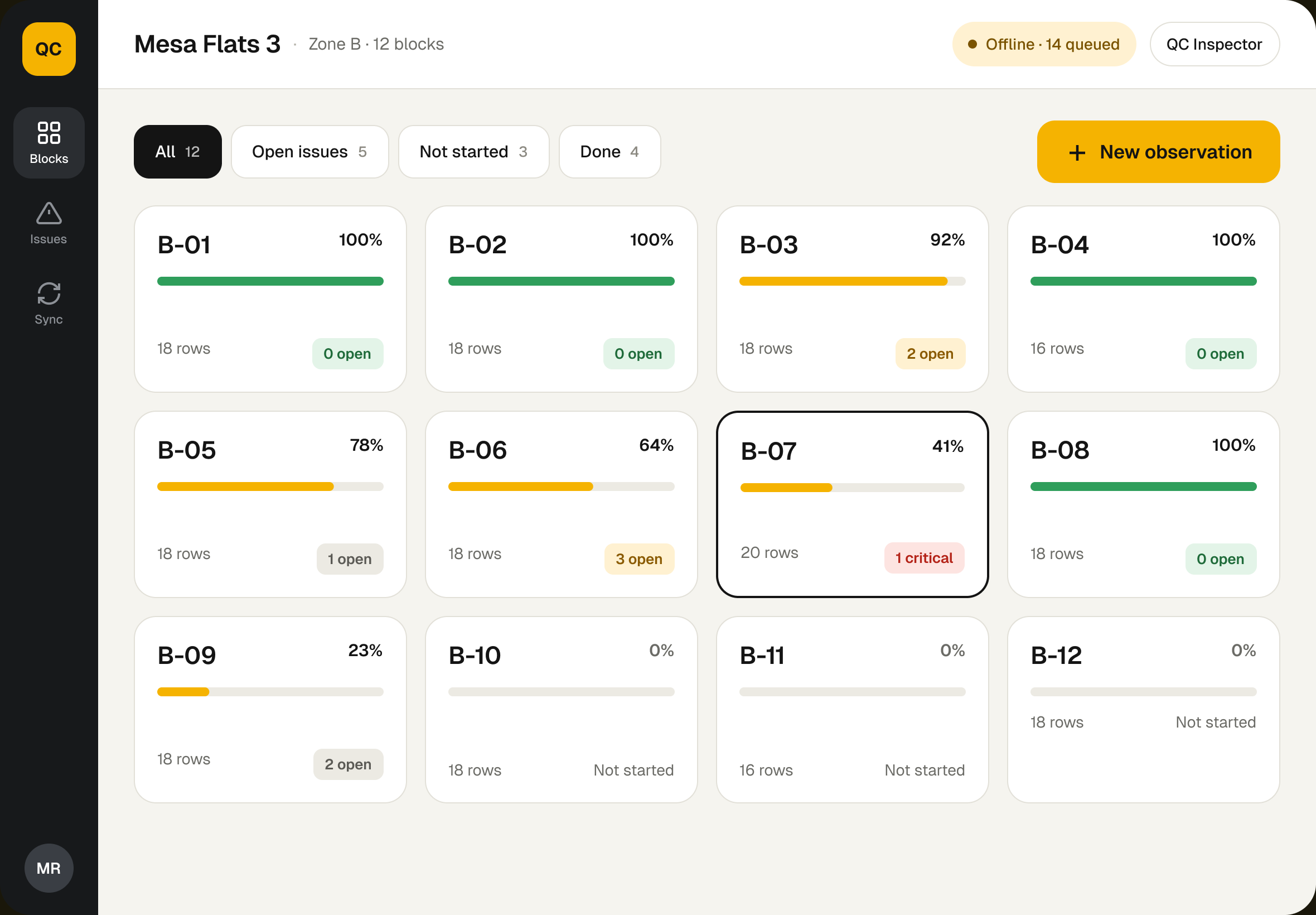
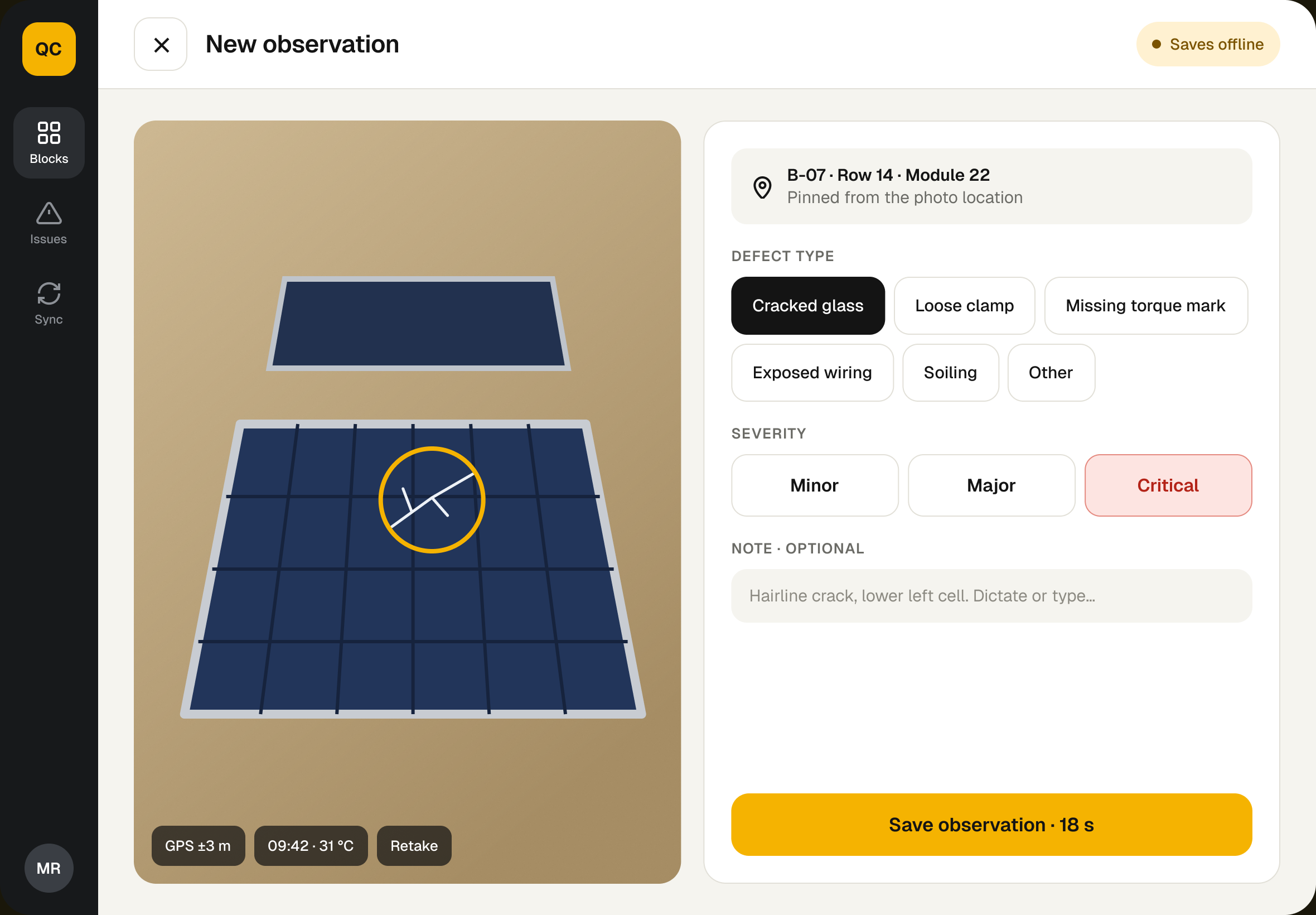
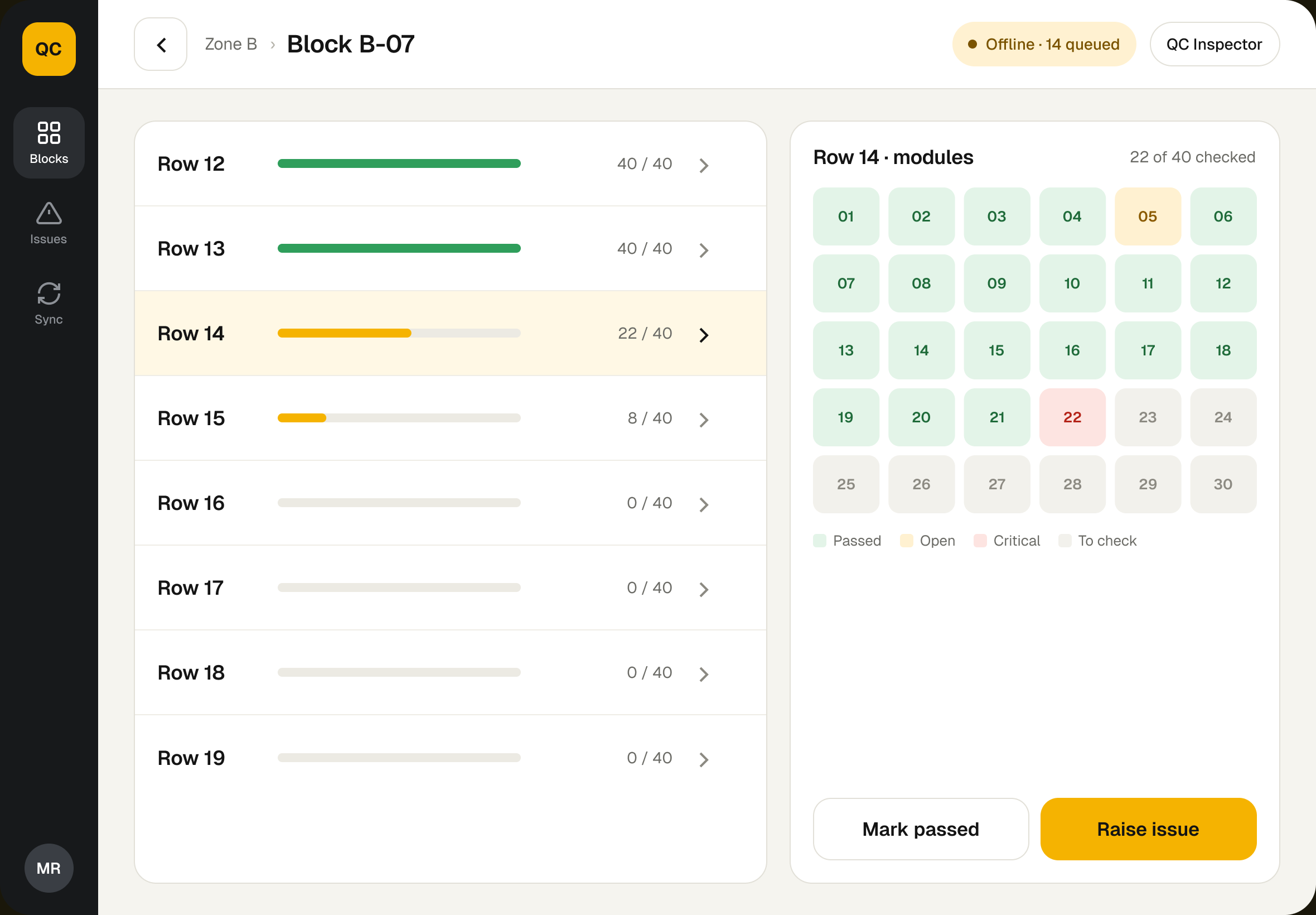
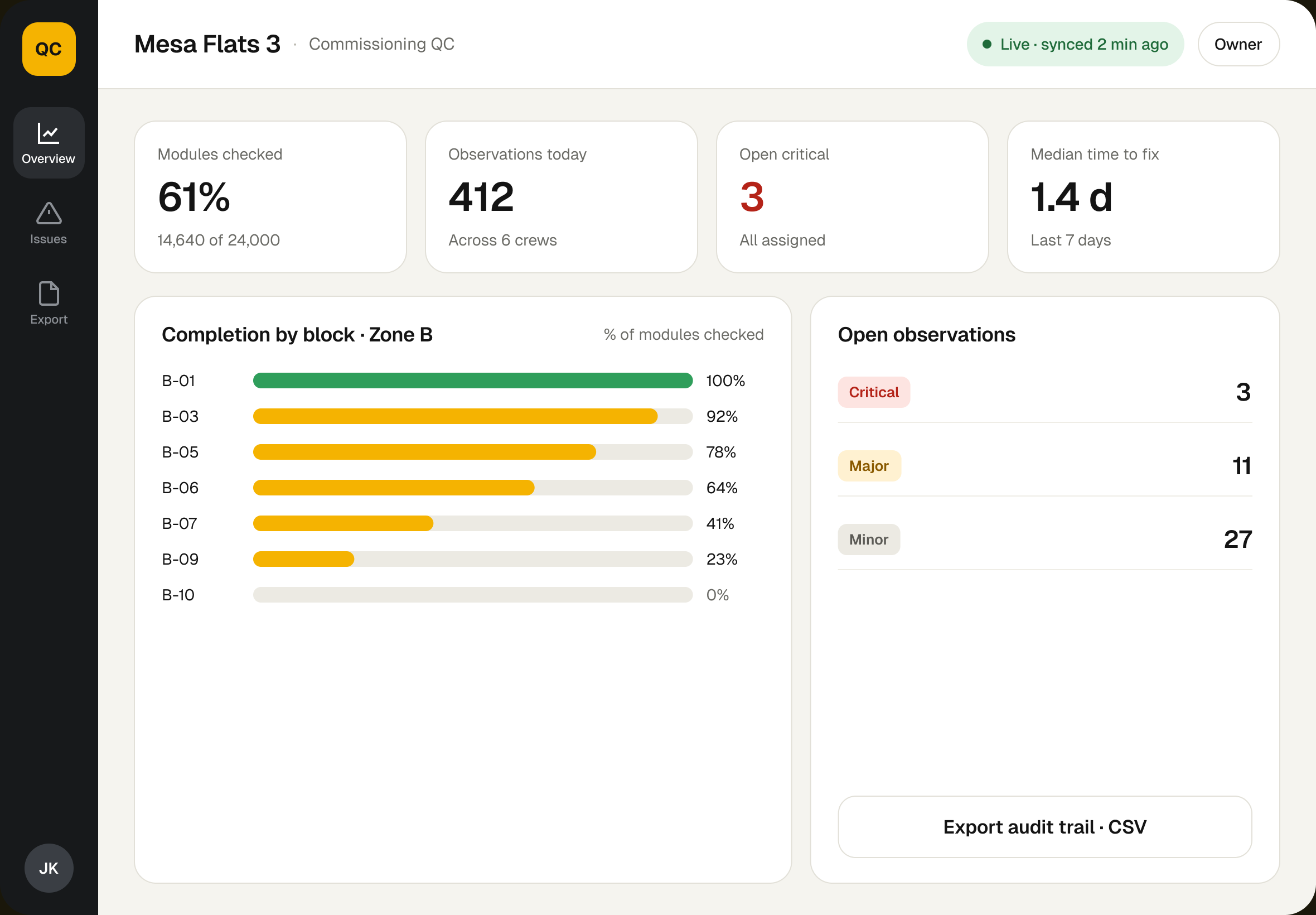
Blocks overview with completion and open issues per block Raise a new observation with photo, defect type and severity
Terabase Energy · Lighthouse

A solar farm as a graph, so delays show up before the phone call

Design lead via HTEC · 2022 · 9 months

SolarWeb platformGraph UI
Read case study
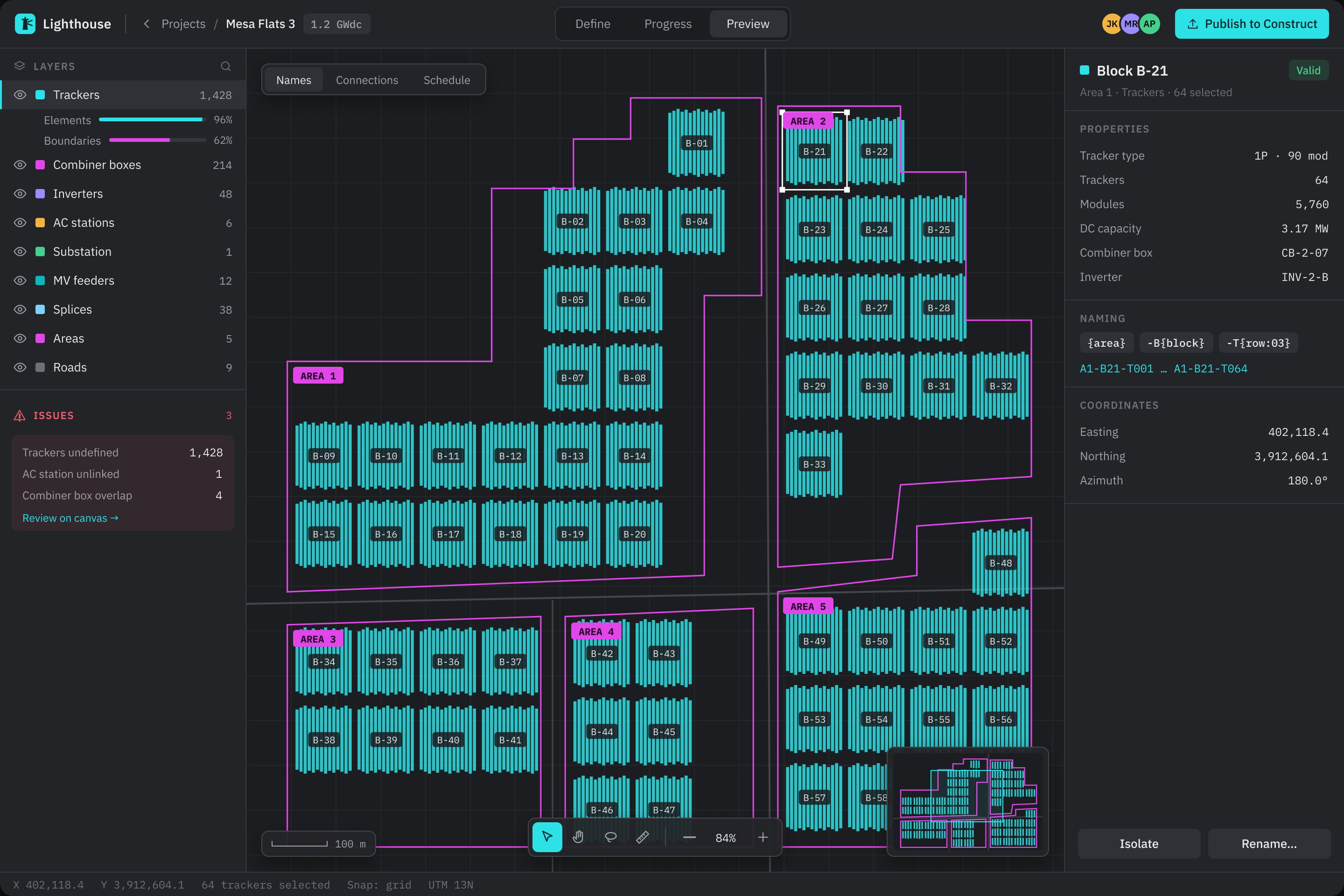
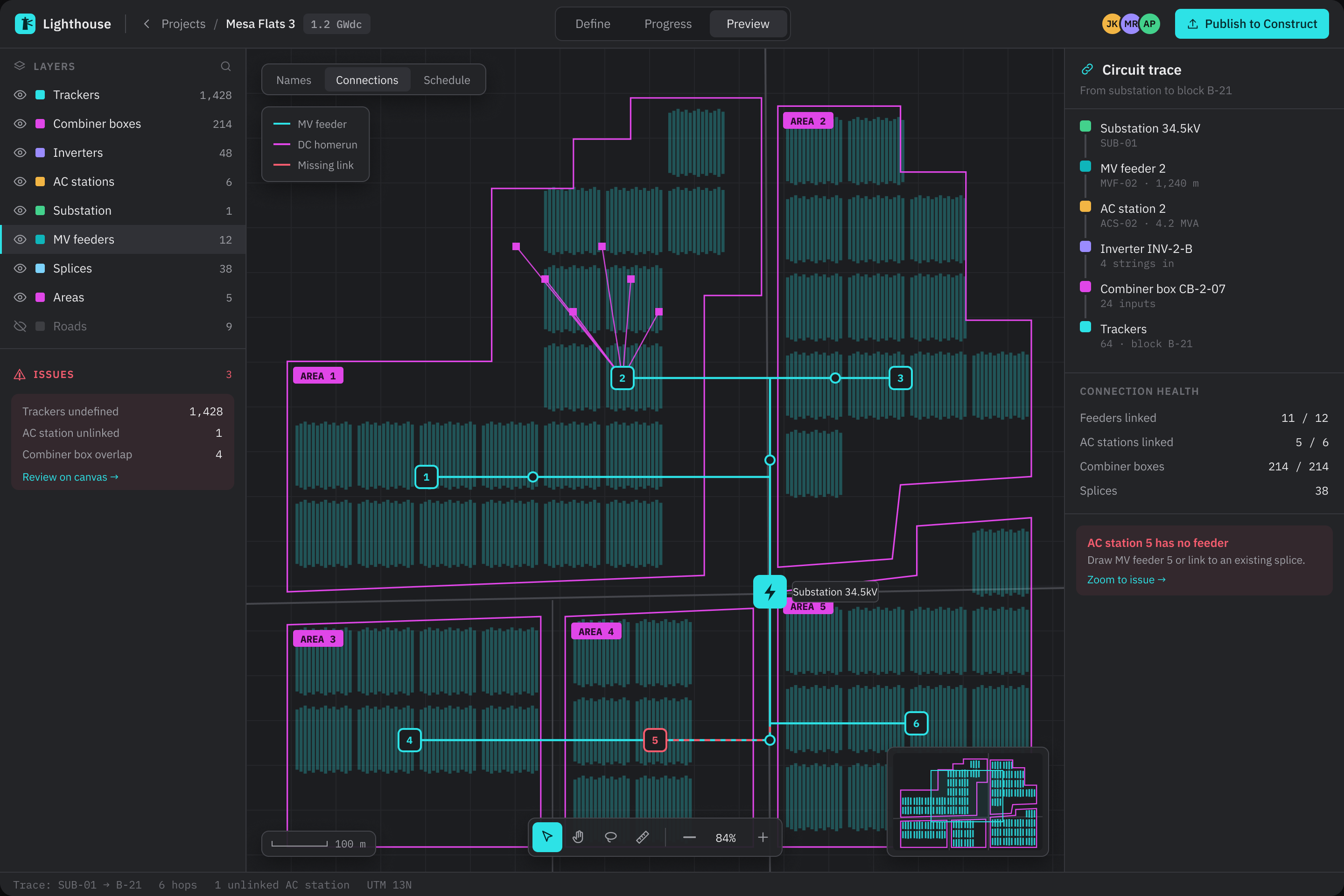
Lighthouse canvas with blocks of trackers, layers and an inspector panel
Global media platform · Full NDA

One content model for a creator portal and two review tools

Senior Product Designer via HTEC · 3 years, embedded

PublishingReview toolsmacOS · iOS
Read case study
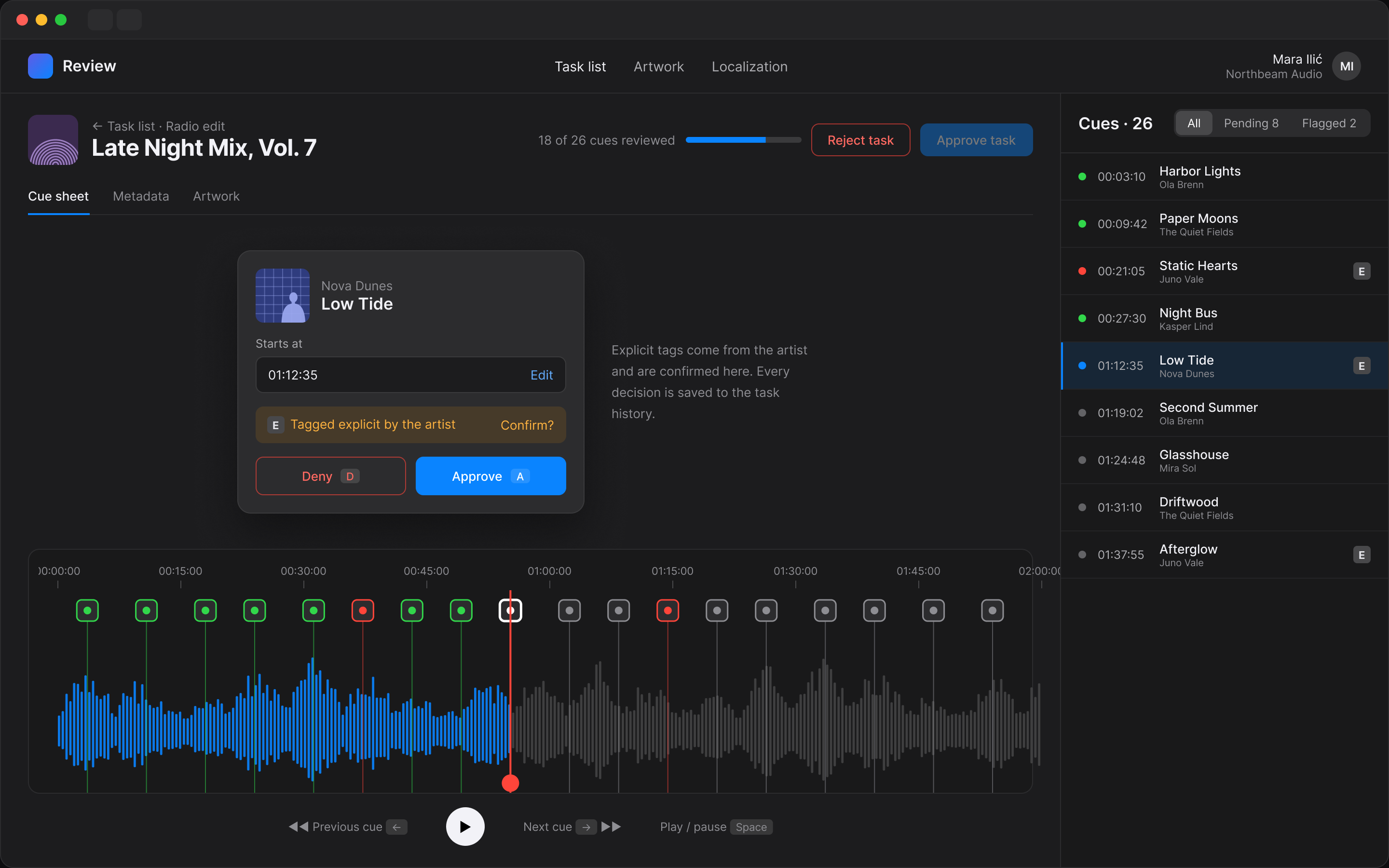
Cue sheet review with a waveform timeline, cue markers and approve or deny per cue
Crowdhouse · Kroon Studio

Owning part of a Swiss apartment building, from your phone

Product Designer, Kroon Studio · Mobile app · Redesign

ProptechFintechMobile
Read case study

Concepts

Self-initiated projects: no client and no real data, made to explore a problem end to end.

Self-initiated concept · Orvia

A banking app, and the design system that switches it to dark

Self-initiated · 2026 · Concept

FintechDesign systemWeb · mobile
Read case study
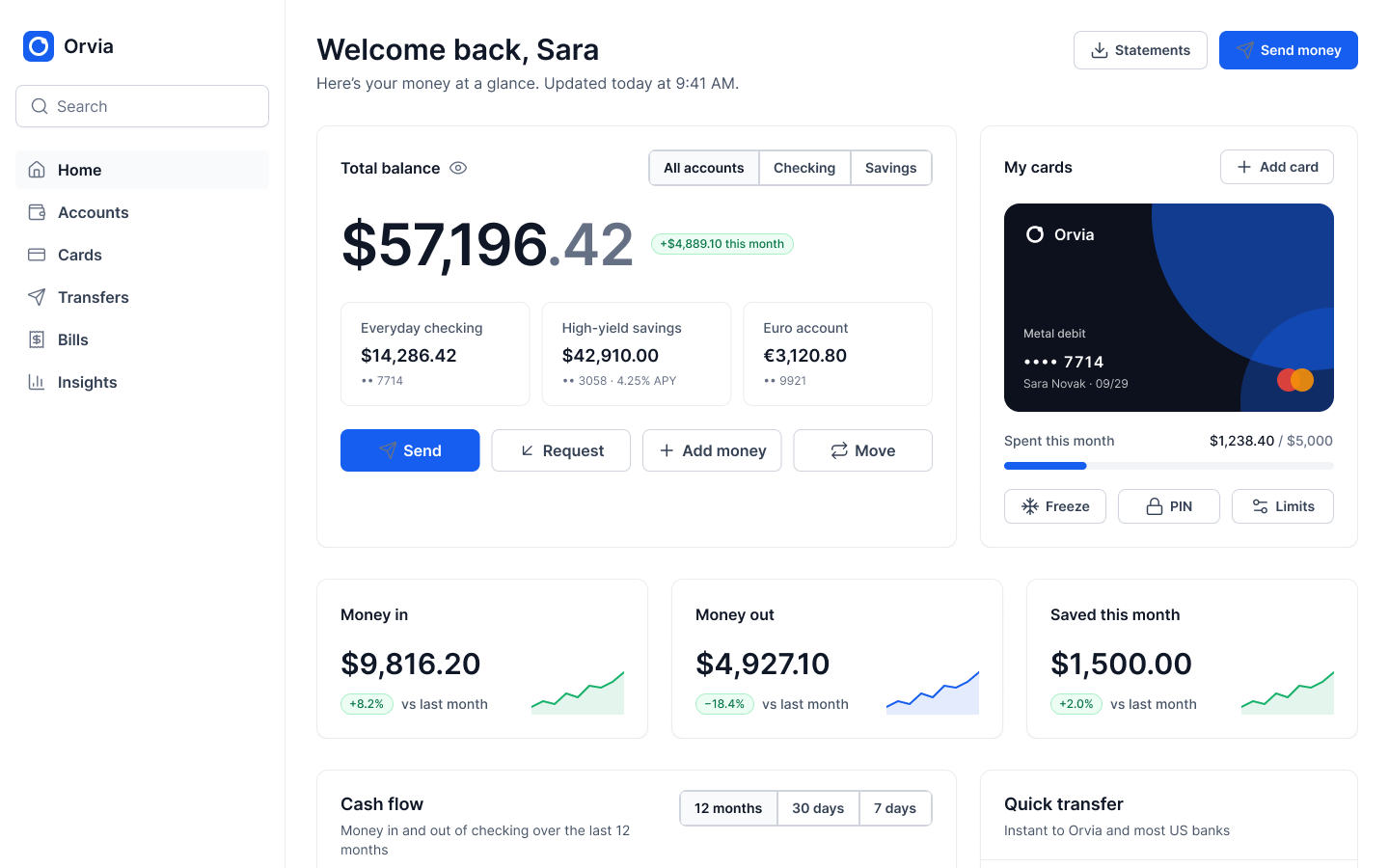
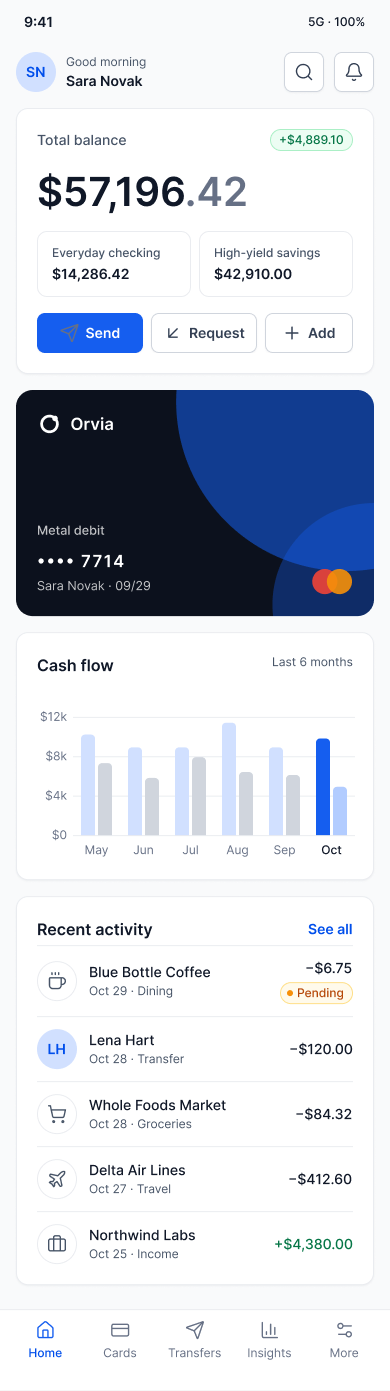
Orvia home screen with total balance, debit card and metric cards

How I work

Four habits that show up in every project, from wind analytics to a field tablet app.

  1. 01

    Go to the work

    I start where the work happens: three weeks shadowing turbine engineers on AEP Explorer, a week on an active solar site for QC Inspector. The brief usually changes once you see the job.

  2. 02

    Model before screens

    Entities, roles and decisions come first, then the views onto them. On Lighthouse the graph model existed before any wireframe, so every screen stayed consistent with it.

  3. 03

    Prototype in code, test early

    I vibe code clickable prototypes with Claude, Cursor and Figma Make and test them with real users, so feedback is about behaviour, not static pictures.

  4. 04

    Hand off a system

    Tokens, components and every state documented, so engineering ships what was designed. I’ve led four design systems that teams kept using after handoff.

About

I design for people who make expensive decisions from dense data: performance engineers looking for lost energy, QC crews on a solar site with no signal, fleet drivers paying at a pump.

Before product design I was an investigative journalist and copywriter. The method stayed: talk to the people closest to the work, map what really happens, then cut each screen down to what someone needs at the moment they decide. On AEP Explorer that meant three weeks shadowing turbine engineers before I opened Figma.

Most of my work is embedded with engineering teams on long-running B2B products, as a senior IC or design lead. I test with real users and have led four design systems that teams kept using after handoff.

AI is part of how I work every day. I vibe code working prototypes with Claude, Claude Code, Cursor and Figma Make, so people click through real states instead of static screens, and I use AI to synthesise research faster while keeping the decisions human. I also design AI features themselves: confidence, fallback and human-override states. This portfolio, live demos included, was vibe coded with Claude Code.

Off-screen I write songs and play guitar. Regrettably serious.

Product design

  • Data visualisation
  • Information architecture
  • Design systems & tokens
  • Field & offline-first UX
  • Usability testing
  • Service blueprinting
  • Figma

AI workflow

  • Vibe coding
  • Claude & Claude Code
  • Cursor
  • Figma Make
  • AI-assisted prototyping
  • AI research synthesis
  • AI feature design · human-in-the-loop
2024 – now
Senior Product Designer · ReSupply, contractDonor experience and design system for a donation logistics platform
2021 – 2024
Senior Product Designer · HTEC GroupEmbedded with Siemens Gamesa, Terabase Energy and a global media platform
2020 – 2021
Lead Designer · P3 GroupFour products at once, including Volkswagen Log&Pay and a Vattenfall field-service app
2019 – 2020
UX/UI Designer · KupujemProdajemListing and checkout flows for Serbia’s largest marketplace
2016 – 2018
UX/UI Designer · Kroon StudioWeb and app products for international clients, concept to launch
2011 – 2015
Journalist, copywriter · Serbia on the Move, Widewalls

Off-screen

A few photos from life outside Figma. Hover one to pick it up.

Ivan in red light, lost in thought
Writing a song. Or a design critique. Same face.
Ivan in a yellow t-shirt at a busy event
Listening mode. Old journalist habits.
Marble sculpture of a bearded figure, mid-shout
Me when someone says “just make the logo bigger”.
Beach at sunset, pink sky over the waves
Where my brain goes between sprints.
Busy street at night with glowing lanterns
Wayfinding research, after hours.
City canal between buildings on a grey day
Even the river has a clear information architecture.
Downtown street between tall buildings
Collecting good typography from street signs.

Let’s make something good together.

Hiring for a senior or lead product design role, or need a designer for a complex product? Send the brief or book 30 minutes.
Showing wind operators where energy is lost, in seconds

AEP Explorer helps operators track energy across hundreds of turbines in several countries. I designed its loss analytics and fleet comparison, from field research to handoff.

EnergyEnterprise SaaSData viz

Redesign of the original work · original under NDA

ClientSiemens Gamesa (NDA)
RoleProduct Designer via HTEC
Duration12 months, 2023
PlatformDesktop web
<30 sto the top loss cause, down from 4+ minutes in testing
300+alarm categories brought into one data model
20 → 6filters left after four rounds of testing

The problem

Engineers had plenty of data: alarms, signal logs, production figures. What they couldn't do was answer one question quickly: where did we lose energy, and why?

  • Hundreds of alarm types, with nothing separating critical from informational.
  • Monitoring worked site by site, with no way to compare across the fleet.
  • Lost energy was hard to attribute to grid, ambient conditions, maintenance or failure.

Research

I spent three weeks shadowing turbine engineers before opening Figma, mapped their workflows and found four personas with conflicting needs. The goal became simple: show less data, but the right data at the moment someone has to decide.

One flow, three screens

The redesign is built around the path an operator takes on a bad day, which is the walkthrough at the top.

  • Spot the anomaly. The overview leads with four north-star numbers and a plain-language insight: lost energy is up 4.2%, mostly from Run stops at one site.
  • Find the cause. One click opens the losses report, where the waterfall makes Run the biggest drop and the root-cause list names the pitch fault.
  • Act on the turbine. The turbine view shows samples falling below the warranted power curve, and the work order is created from the same screen.
The main flow in 35 seconds: lost energy is up on the overview, the waterfall shows Run stops as the biggest cause, the map leads to Gijón Windfarm and one turbine with a pitch fault, then the site is compared with the fleet and checked for icing.
Losses report. Every category of lost energy sits between producible and actual production, so the biggest cause is the first thing you see.

Key decisions

Proportion over precision

Sortable tables couldn't show which cause mattered most. A visual breakdown cut time to the top cause from over 4 minutes to under 30 seconds.

Context on the map

Turbine stats were three clicks from a map pin. A side panel now shows them without leaving the map.

Saved filter presets

Engineers watch the same fleet subset for weeks. Named presets were the most requested feature in every testing round.

Turbine detail: the power curve against the warranted curve, live signals and the day's events in one view.

Left: comparing sites across the fleet, the view operators never had before. Right: icing, one of the loss categories, as its own focused view.

Outcome

  • Shipped. Operations teams use the dashboard, losses report, map and data explorer on live fleets in several countries.
  • A fleet view for the first time. Production compared by region, technology and client in one place.
  • A foundation. The charts, map components, alarm states and filters became the base for later products.

Screens redesigned in 2026 with sample data, so the work can be shown without client branding or real figures. The original product is under NDA.

Next project

Volkswagen Group fleet · LogPayOne app for fuel and EV charging

Fuel and EV charging in one app: find it, pay for it, track it

A driver app for the Volkswagen Group fleet, built with LogPay and P3 Group: one account, one payment method and one map for EV and fuel drivers across Europe.

MobilityFintechiOS · Android

Redesign of the original work · original under NDA

ClientVW Group fleet · LogPay (NDA)
RoleLead Designer, P3 Group
Duration12 months, 2020–2021
PlatformiOS, Android
4 → 1charging networks, one wallet
EV + fuelin one app, no mode to pick first
11pain points from mapping the whole road trip

The problem

EV drivers on European routes carried one app per charging network, each with its own account and payment. Fuel drivers mostly used no app at all.

  • Fragmentation. Four major networks, four apps, gaps on every long route.
  • Two very different sessions. Charging takes about 30 minutes, with states, errors and live pricing. Refuelling takes about 3. EV complexity could not leak into the fuel experience.
  • Mixed fleets. Fleet managers ran EV and fuel vehicles with separate tools and separate expense reports.

Research

I mapped the whole road trip: planning, finding a station en route, the session itself and the expense afterwards. That surfaced 11 pain points and four personas: the EV commuter, the long-distance driver, the fleet manager and the fuel driver. One app had to serve all four without asking anyone to pick a mode.

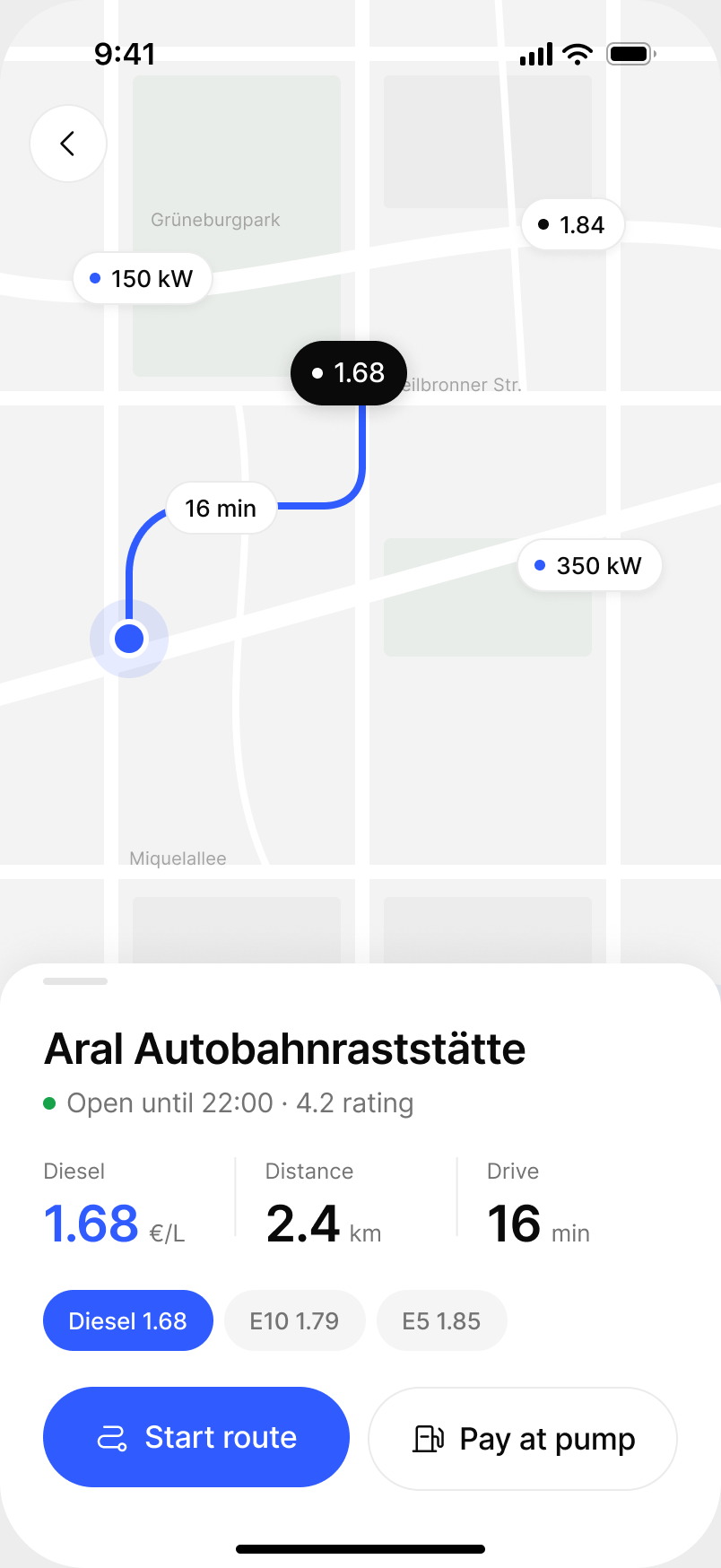
Map firstPrices and charging speeds on the map, nearby stations below.
Route previewPrice, distance and drive time before you commit.
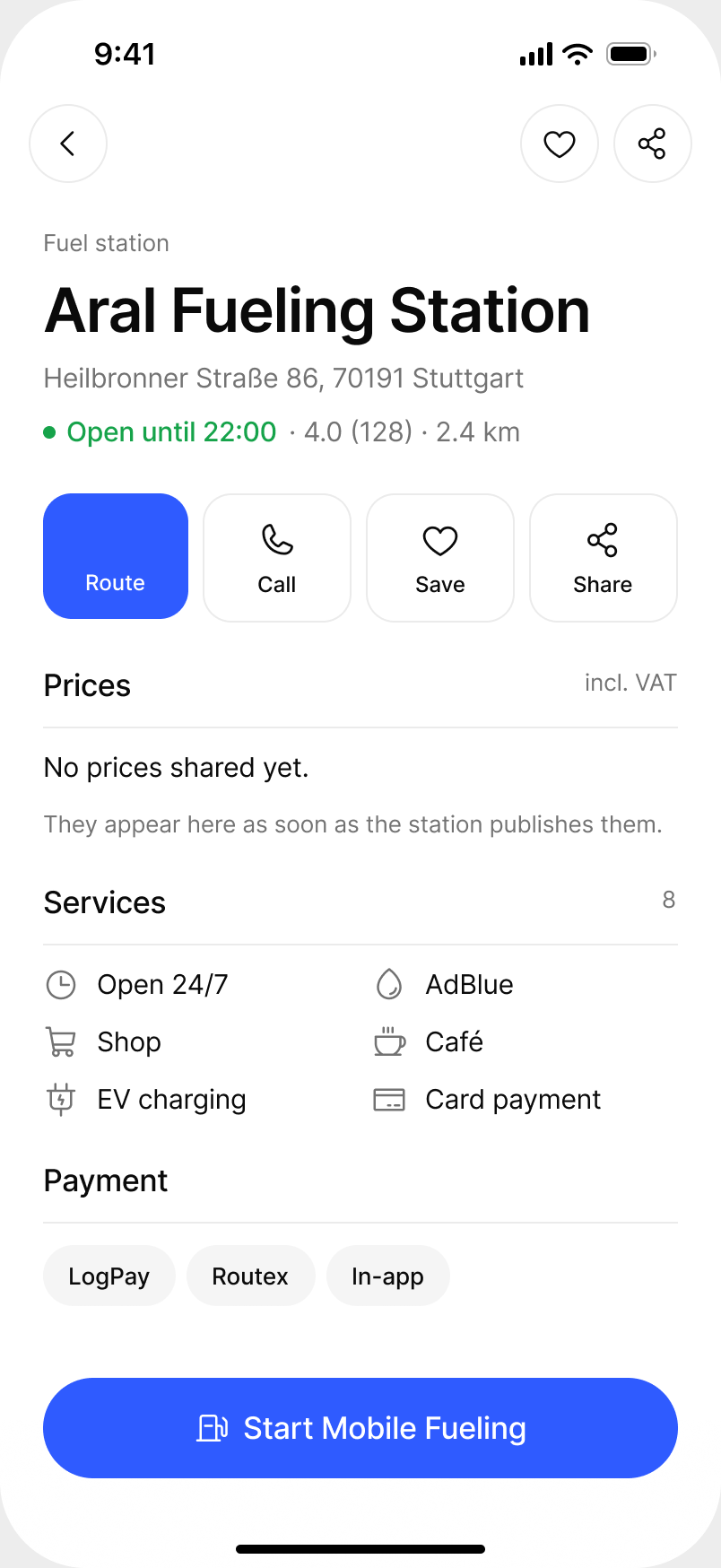
Station detailThe same layout for fuel and charging stations.

Key decisions

Map first, not list first

A driver low on charge needs the nearest option, not a list to read. Discovery, availability, price and routing all start on the map.

One wallet, four networks

Payment hides the network. Drivers pay the same way whoever owns the charger or the pump.

Every state has a signal

Each step of a session looks different, so nobody has to ask whether the car is actually charging. That was the top support question of the previous app.

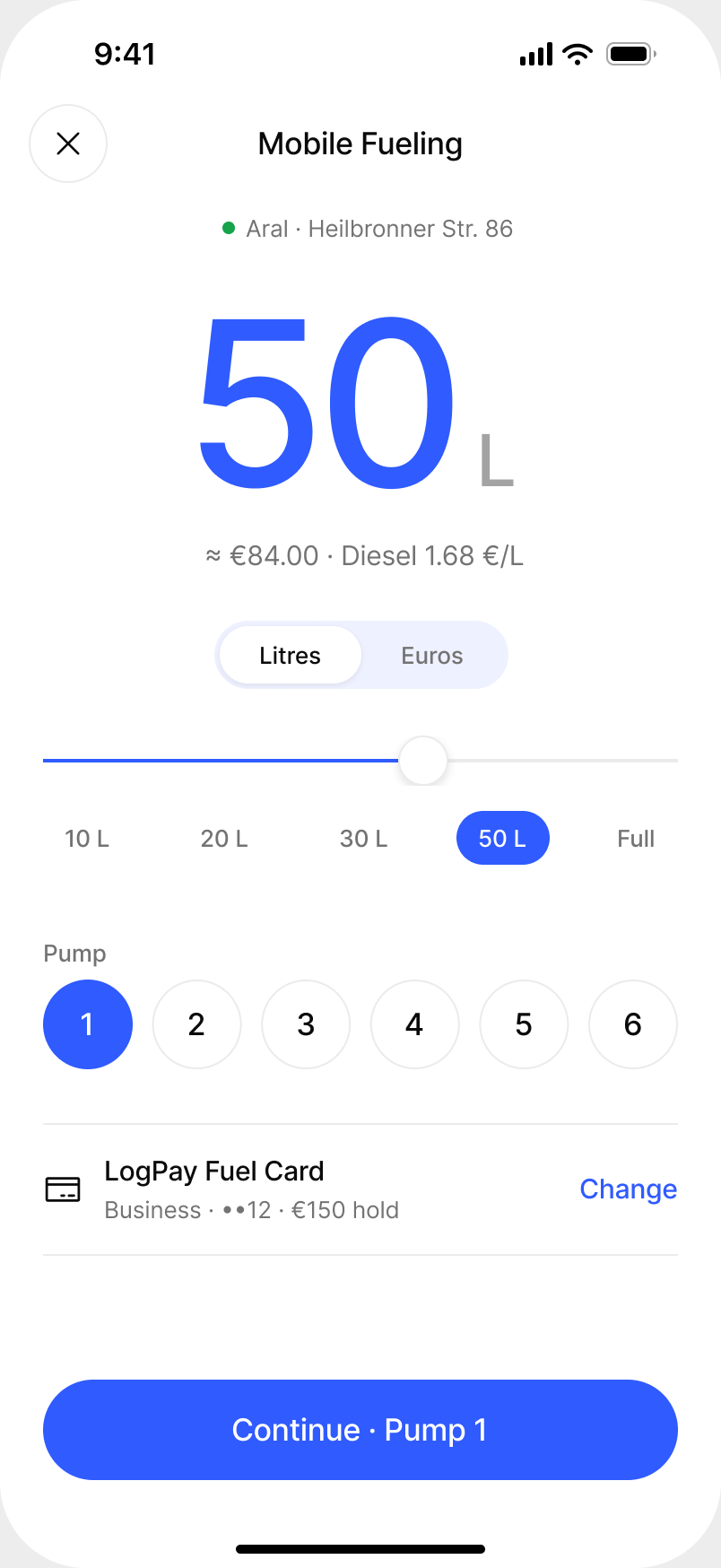
01Choose amount and pumpPump number as shown on the pump.
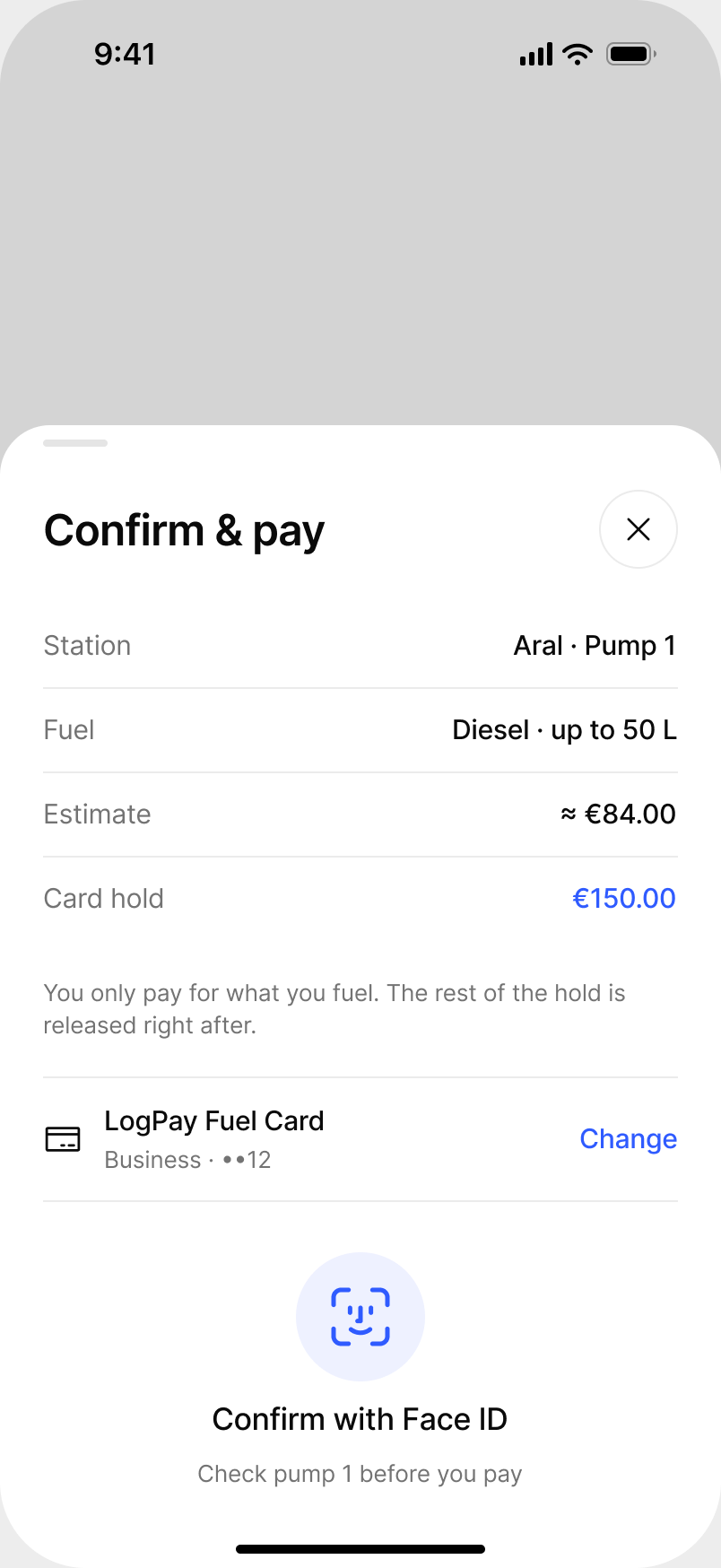
02Confirm and pay€150 reserved, only what you fuel is charged.
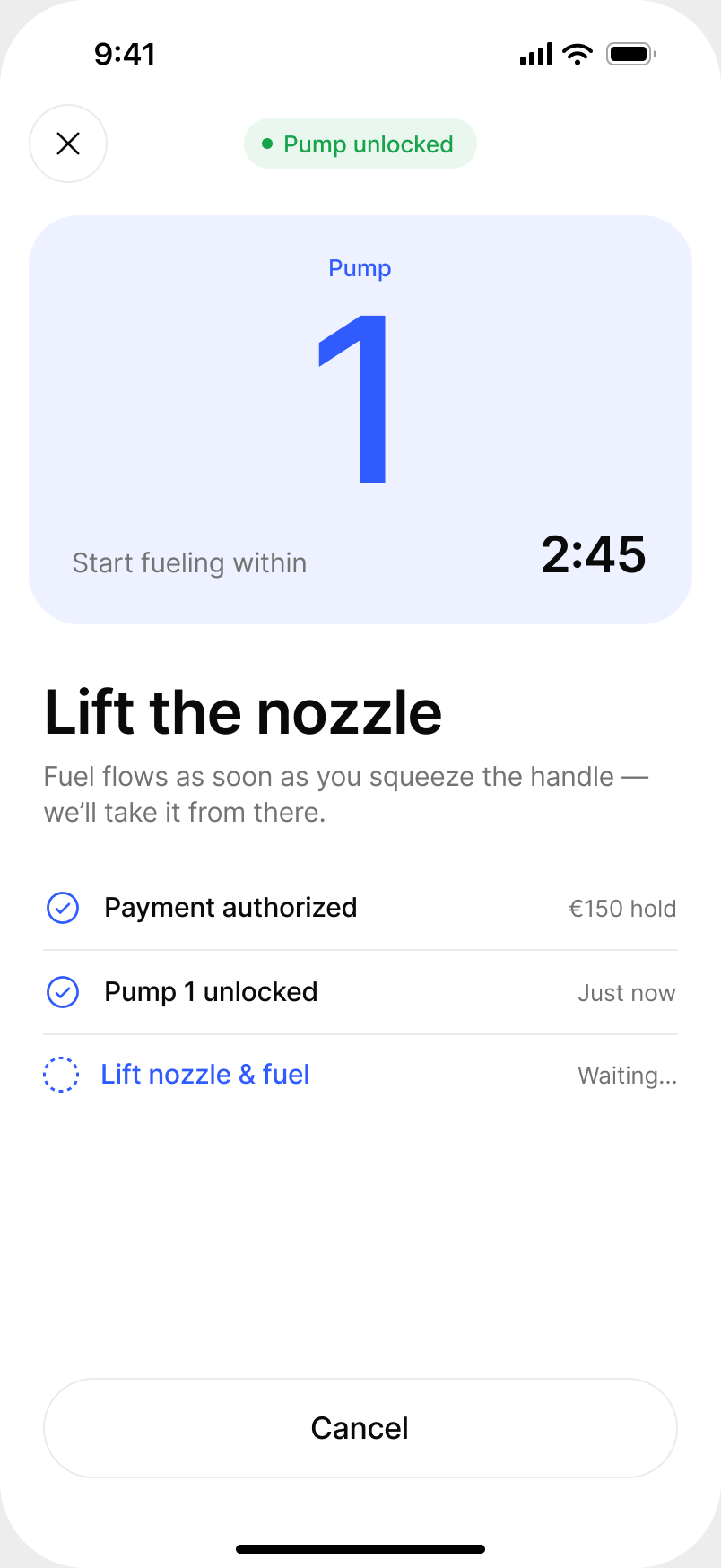
03Lift the nozzlePump unlocked, countdown to start.
04Fueling liveLitres and amount update as you fuel.
05Live ActivityProgress on the lock screen.
06ReceiptPrivate or business, right away.
Mobile fueling, from choosing the pump to the receipt. Scroll sideways for all six steps.

When things go wrong

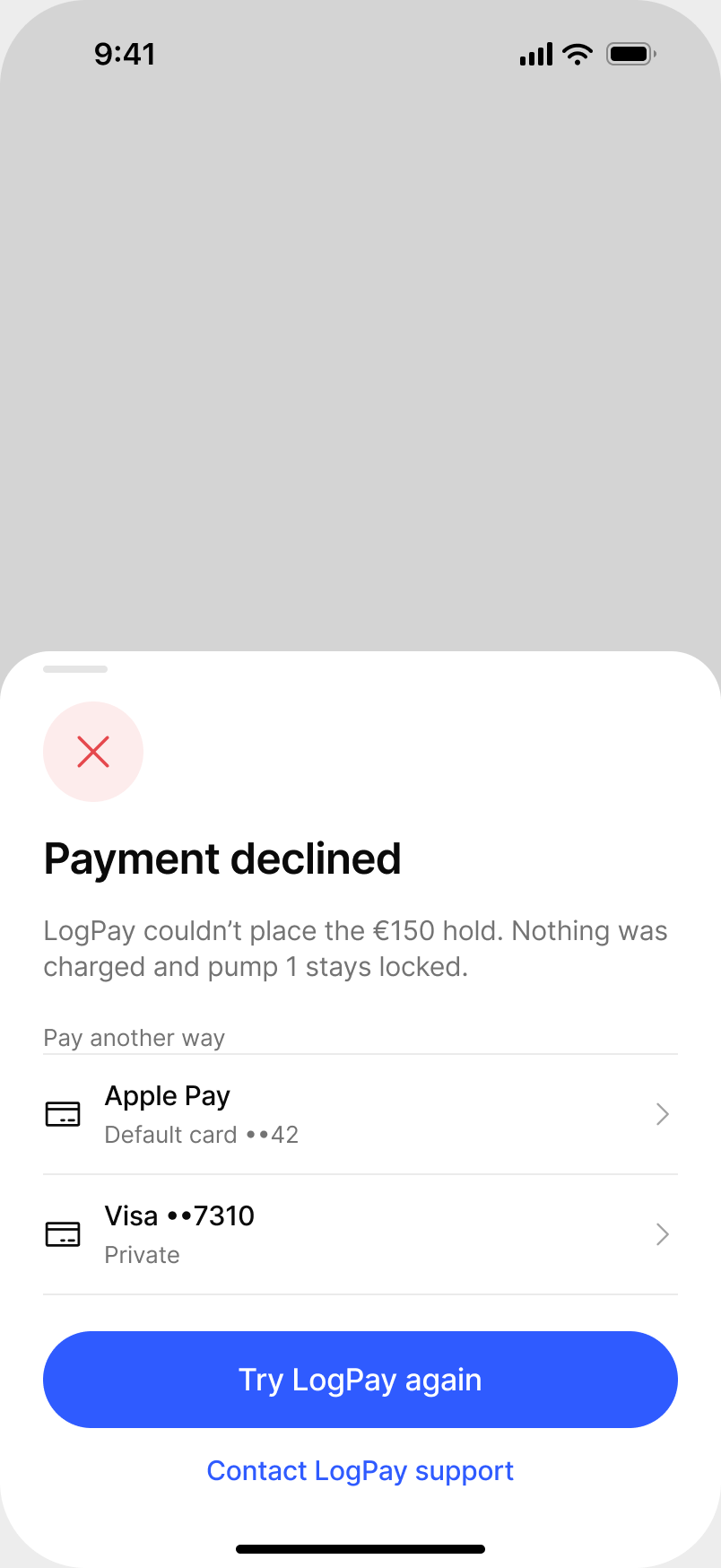
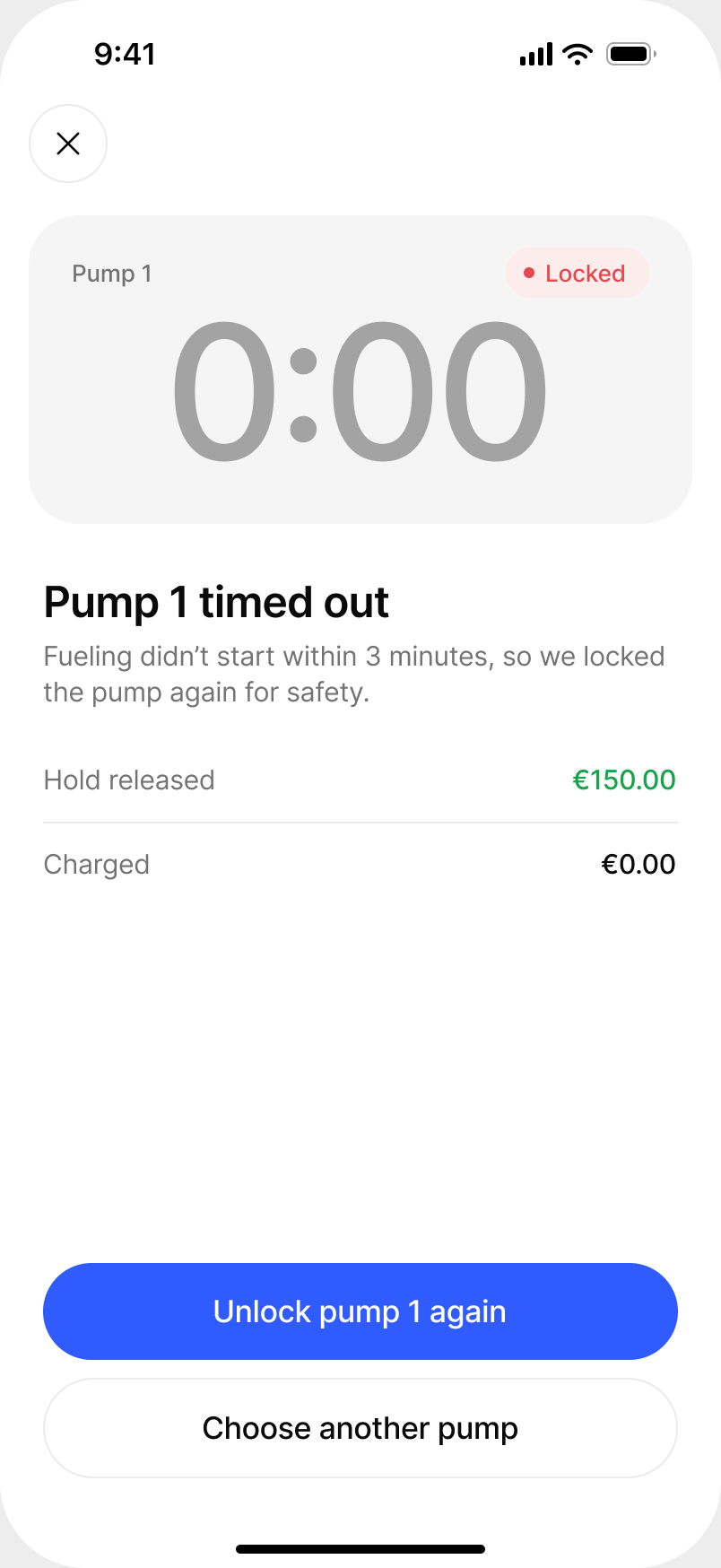
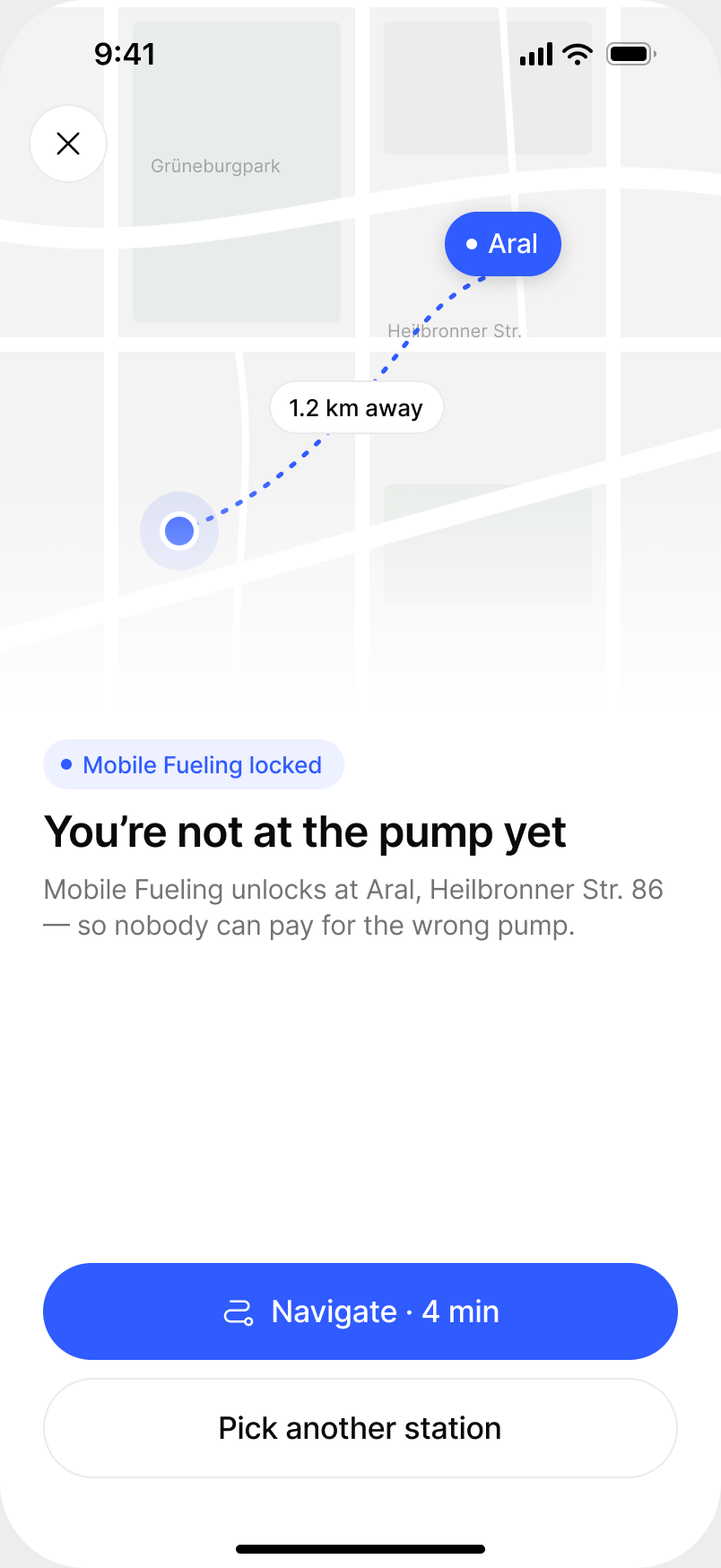
Payment at a pump is where trust breaks. Every error says what happened to the money first, then offers a way forward.

Payment declinedNothing charged, pump stays locked, pay another way.
Pump timed outReservation released, unlock again or pick another pump.
Not at the stationExplains why, offers navigation to the station.

An unplanned use case

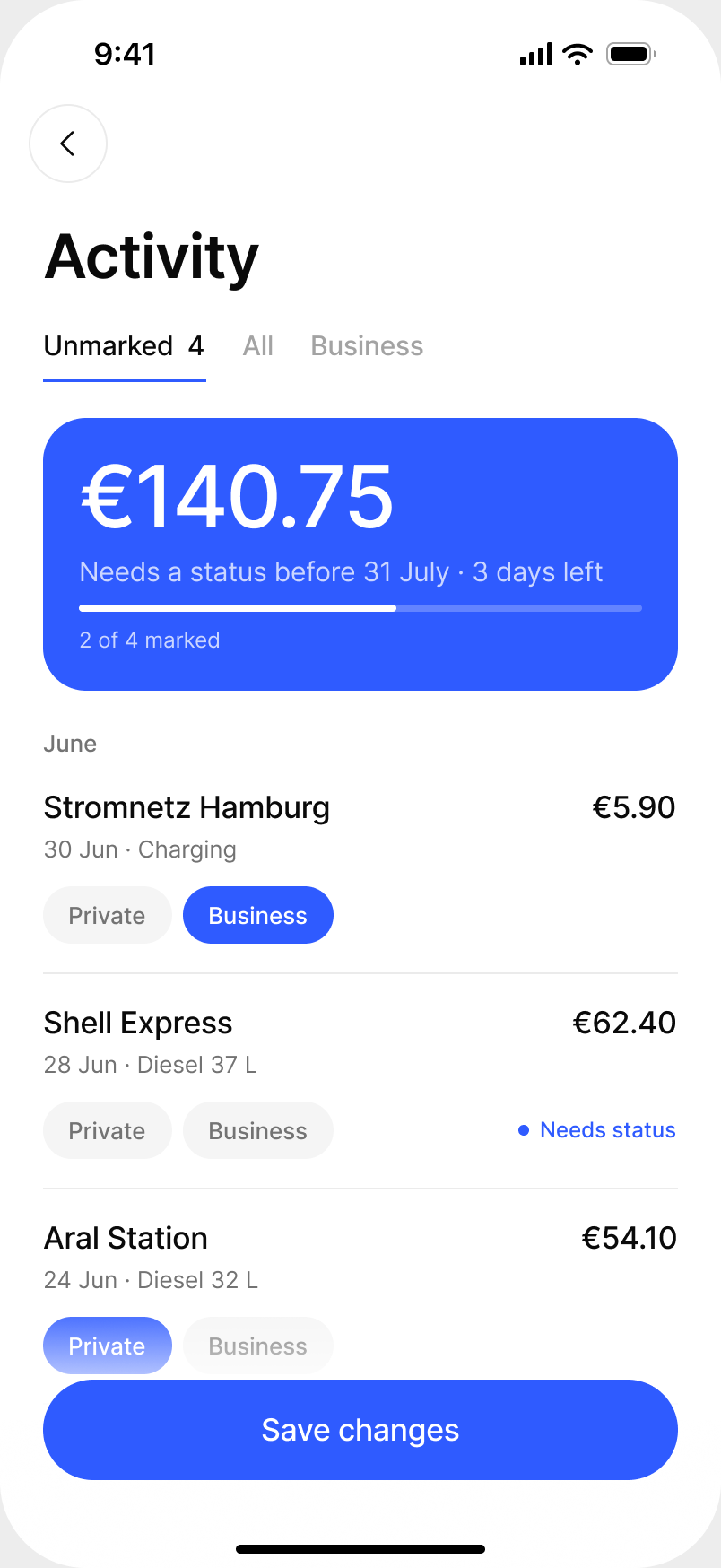
Fleet managers started using the app as an expense tool for mixed fleets, which shaped later iterations. Marking a transaction as private or business now happens in the flow, with a reminder before the monthly deadline.

ActivityTransactions that still need a private or business status.
ReceiptPrivate or business, chosen on the spot.

Outcome

  • One product for both drivers. One account, one payment method and one map for EV and fuel.
  • Four charging networks behind one wallet.
  • Adopted by fleet managers as an expense tool, a use case nobody planned for.

Screens redesigned in 2026 with sample data, so the work can be shown without client branding. The original product is under NDA.

Next project

Terabase Energy · QC InspectorSolar QC on a tablet, with no signal

From a four-minute paper form to 45 seconds on a tablet, offline

A tablet-first QC tool for utility-scale solar construction at Terabase Energy, built for crews in heat, gloves and direct sun, far from any signal.

SolarField appiPad · Android tablet

Redesign of the original work · original under NDA

ClientTerabase Energy (NDA)
RoleDesign lead, Senior Product Designer via HTEC
Duration7 months, 2021
PlatformiPad, Android tablet
~4 min → <45 sto log one observation, paper vs. app in field tests
0signal needed on site; it syncs later
4 rolesQC, foreman, owner and admin in one structure

The problem

Quality control on solar construction ran on paper and spreadsheets. An estimated 400+ QC notes a day, written by hand, with no record of where on the site a defect actually was.

  • A hostile environment. Heat, humidity, protective gloves and direct sun.
  • Volume. Each observation needed a photo, location, defect type and severity, fast.
  • No signal. Remote desert sites with no cellular or Wi-Fi.
  • Four roles. QC inspectors, foremen, owners and admins needed different views of the same data.

Research

In week one I was on an active construction site in California, shadowing QC workers doing their real job: paper forms, glare, gloves, the pace of the site. Using a five-day design sprint, I took raw field notes to a testable prototype in the same week.

The insight that reshaped the product: workers didn't want a map of the farm. They wanted to know which row and which panel to walk to. Spatial hierarchy beats spatial display.

Navigation follows the work breakdown structure crews already use: site, block, row, module. Every module shows its status at a glance.

Key decisions

Navigate the way crews think

Site → Block → Row → Module mirrors how crews are organised, so there was nothing new to learn.

Offline first

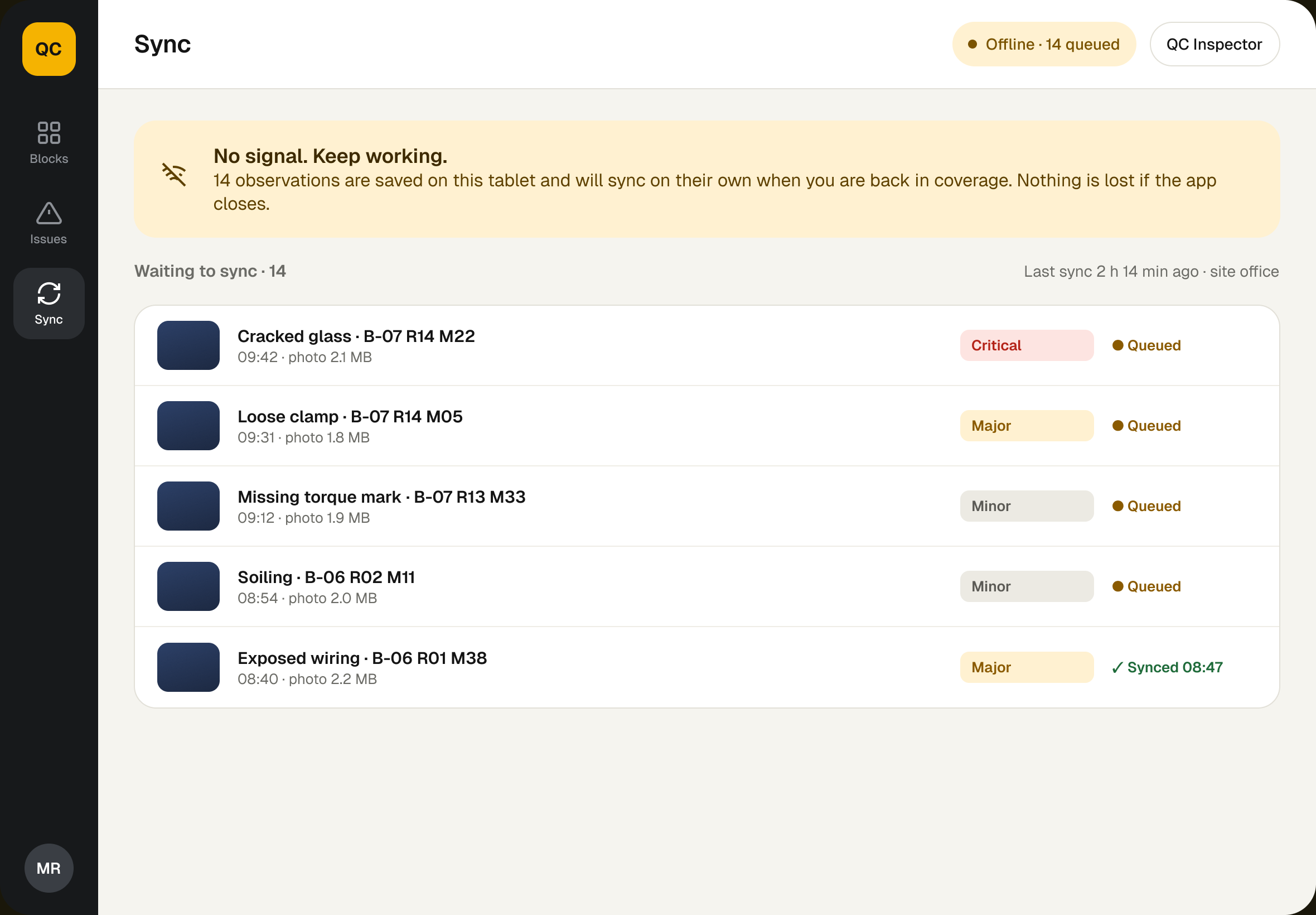
Every observation is saved on the tablet first and merged without conflicts on reconnect. Nobody waits for a network.

Location as a side effect

The camera tags GPS and pins each photo to its module. Workers take the photo; the spatial record builds itself.

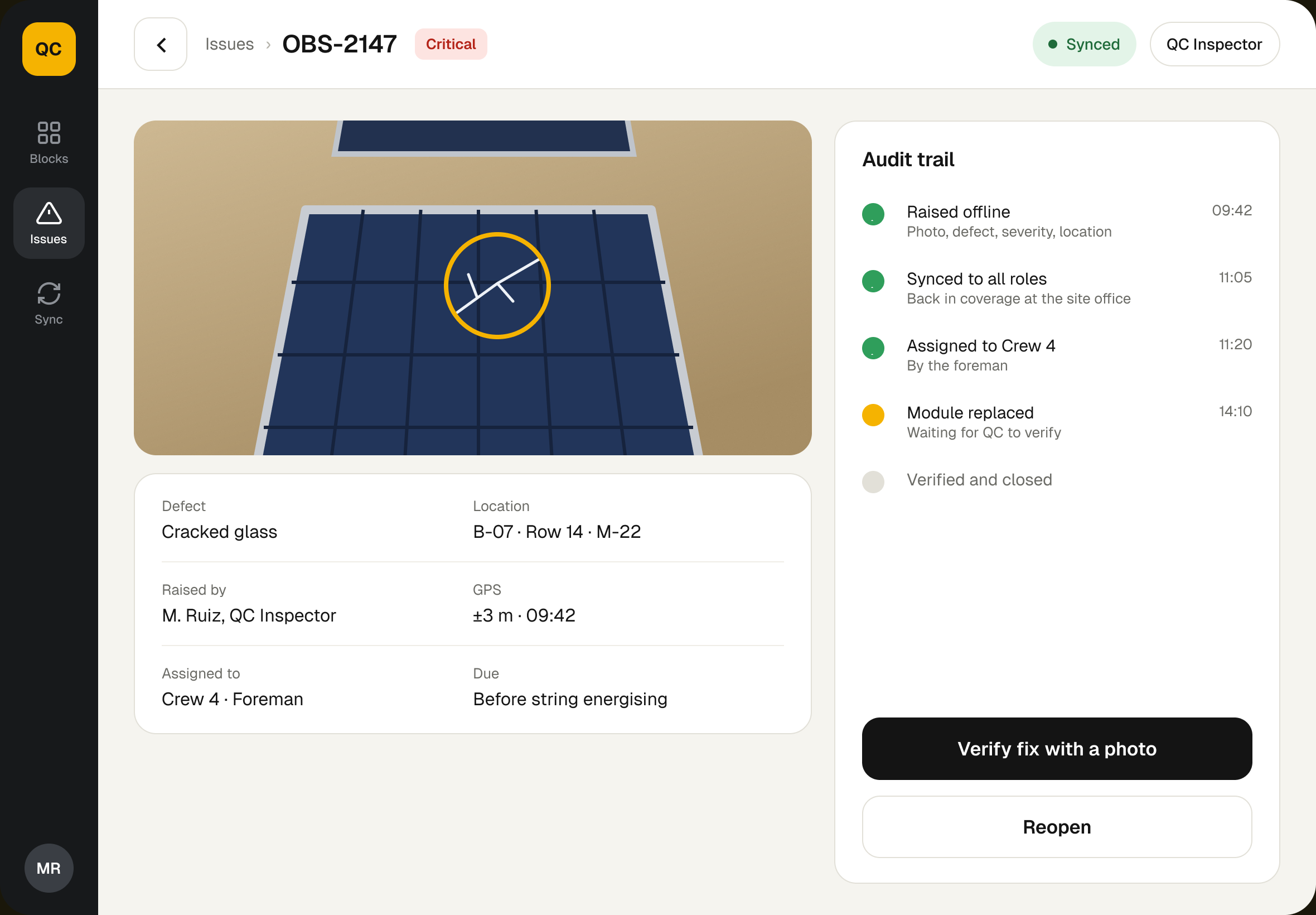
Raising an observation and its audit record. Glove-sized targets and high contrast for direct sun; every defect keeps its photo, location and history.

No signal is the normal state, not an error. The app says what is saved on the tablet and syncs on its own when crews are back in coverage.
Same data, a different view: owners see completion and open issues without calling the site.

Outcome

  • Paper replaced by a structured digital audit trail.
  • Every defect has an address. Geo-tagged, time-stamped, tied to a module and visible to all four roles within seconds of sync.
  • Adopted from day one, because it worked without signal.
  • It grew into a platform. QC data became the live layer of Lighthouse, Terabase's spatial asset platform.

Screens redesigned in 2026 with sample data, so the work can be shown without client branding or real figures. The original product is under NDA.

Next project

Terabase Energy · LighthouseA solar farm as a graph

A solar farm as a graph, so delays show up before the phone call

Lighthouse models a GW-scale solar build as a graph of trackers, strings, combiners and inverters, placed in space and moving through construction milestones. I led design from the data model to handoff.

SolarWeb platformGraph UI

Redesign of the original work · original under NDA

ClientTerabase Energy (NDA)
RoleDesign lead, Senior Product Designer via HTEC
Duration9 months, 2022
PlatformWeb, desktop
10,000+nodes the graph UI was designed to render in a browser
4 rolesEPC lead, owner rep, foreman and admin on one graph
0weekly status calls after EPC leads moved to self-serve reviews

The problem

QC Inspector worked: crews could log observations. But EPC teams still had no spatial picture of site health. Project managers worked from spreadsheets, static CAD exports and phone updates.

  • No adjacency. Spreadsheets had no idea which tracker fed which string.
  • No time layer. Teams learned about delays when a foreman called in.
  • Thousands of connected nodes that had to stay readable without overwhelming anyone.
  • Four roles, four resolutions, from a portfolio overview to a single tracker.

Research

Before drawing a wireframe, I spent two weeks with Terabase engineering mapping every entity and relationship on a solar farm. Then I interviewed EPC leads, owner reps and foremen across three active projects to find the resolution each role needs.

The challenge turned out to be navigation of detail, not display of detail.

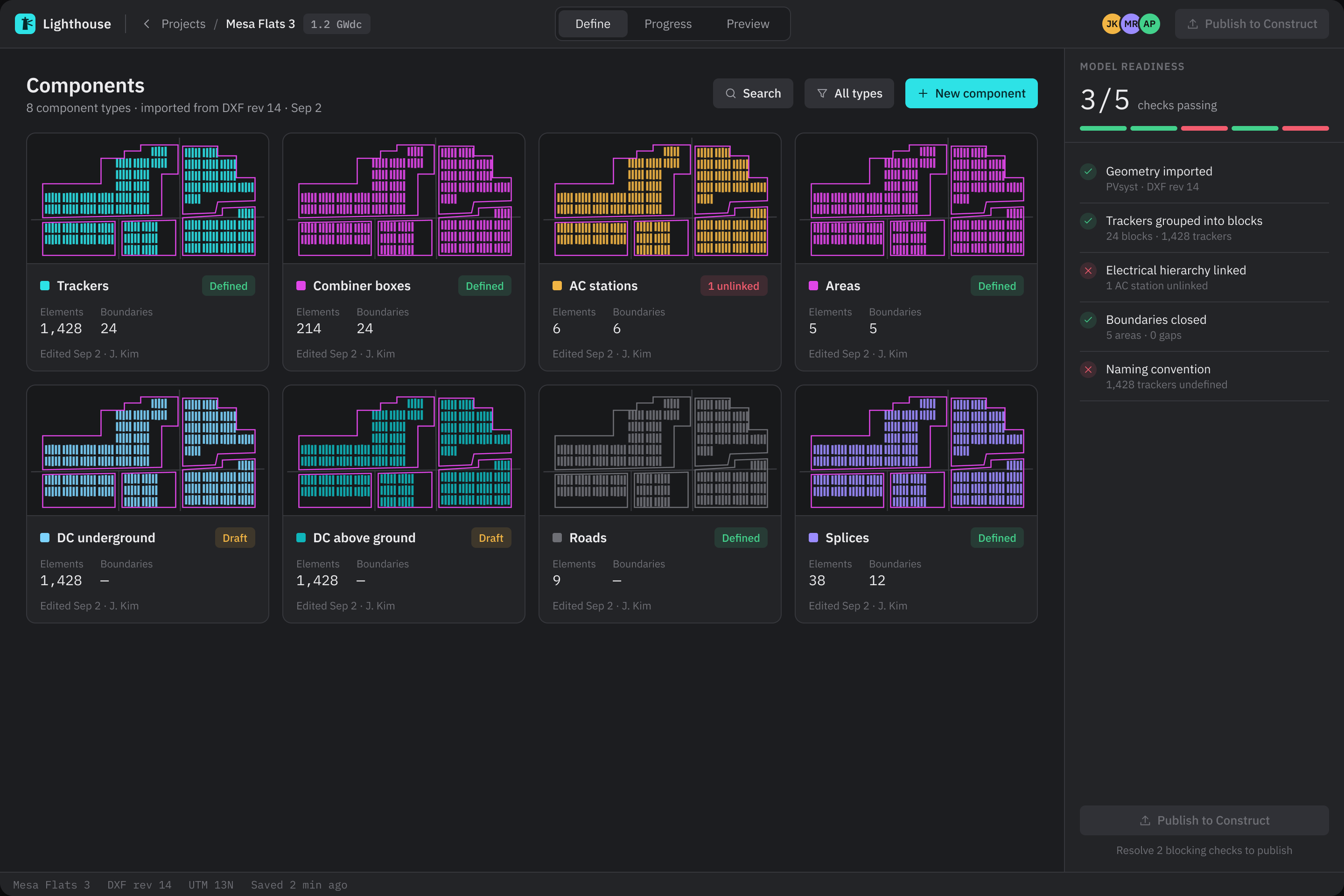
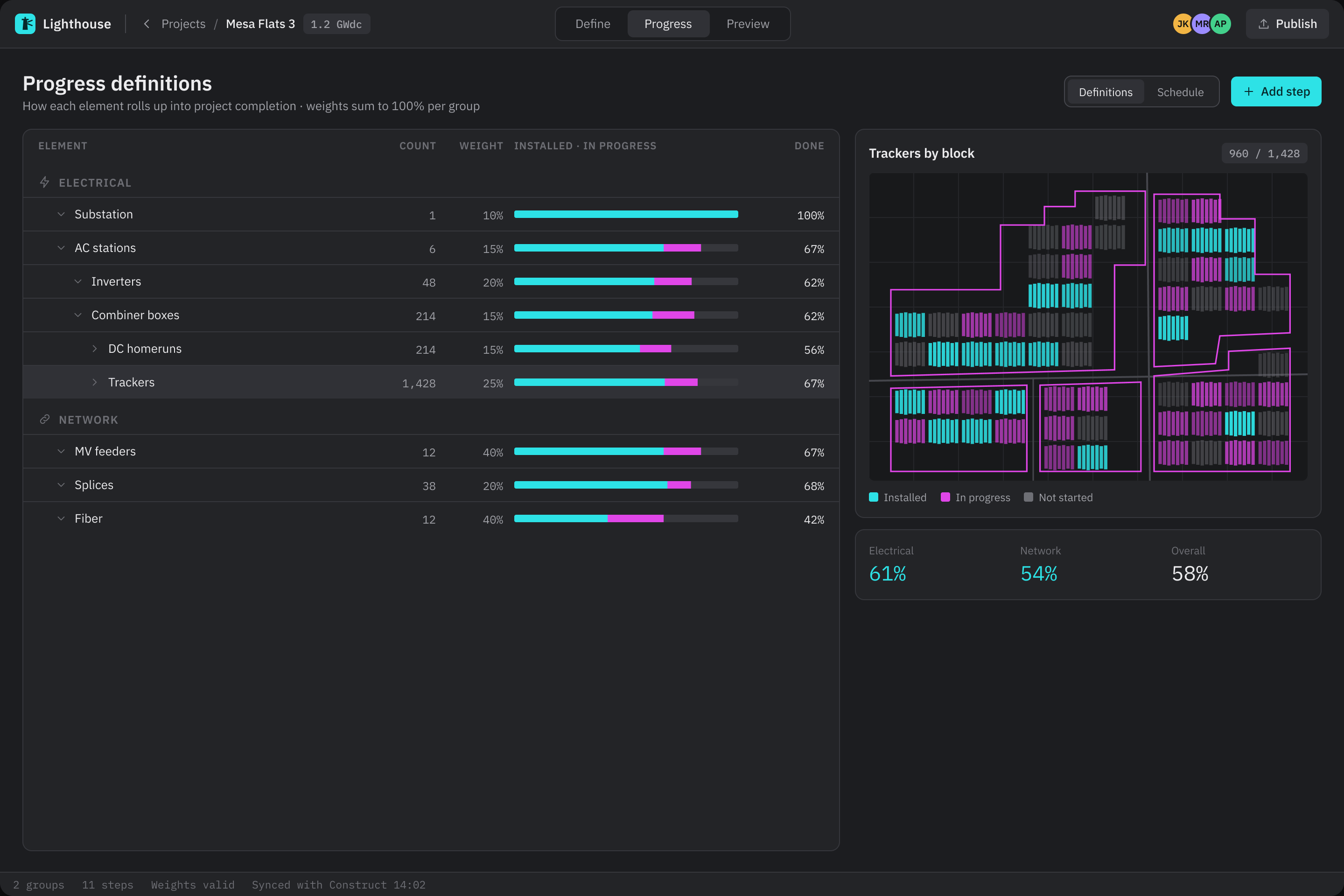
Define: every component type on the site with counts and status, and the checks that must pass before a revision is published.

Key decisions

Start from the data model

The graph structure came first; every screen is a view onto it. The graph isn't a picture of the data, it is the data.

Progressive zoom

Portfolio → site → block → component, the way crews move through a site. Each role lands at its own level.

Status at a glance, real IDs

Built, in progress and not started read instantly on the canvas. Blocks and nodes carry the asset IDs printed on site.

Circuit trace: follow an electrical path through the site and see exactly where it breaks before construction starts.

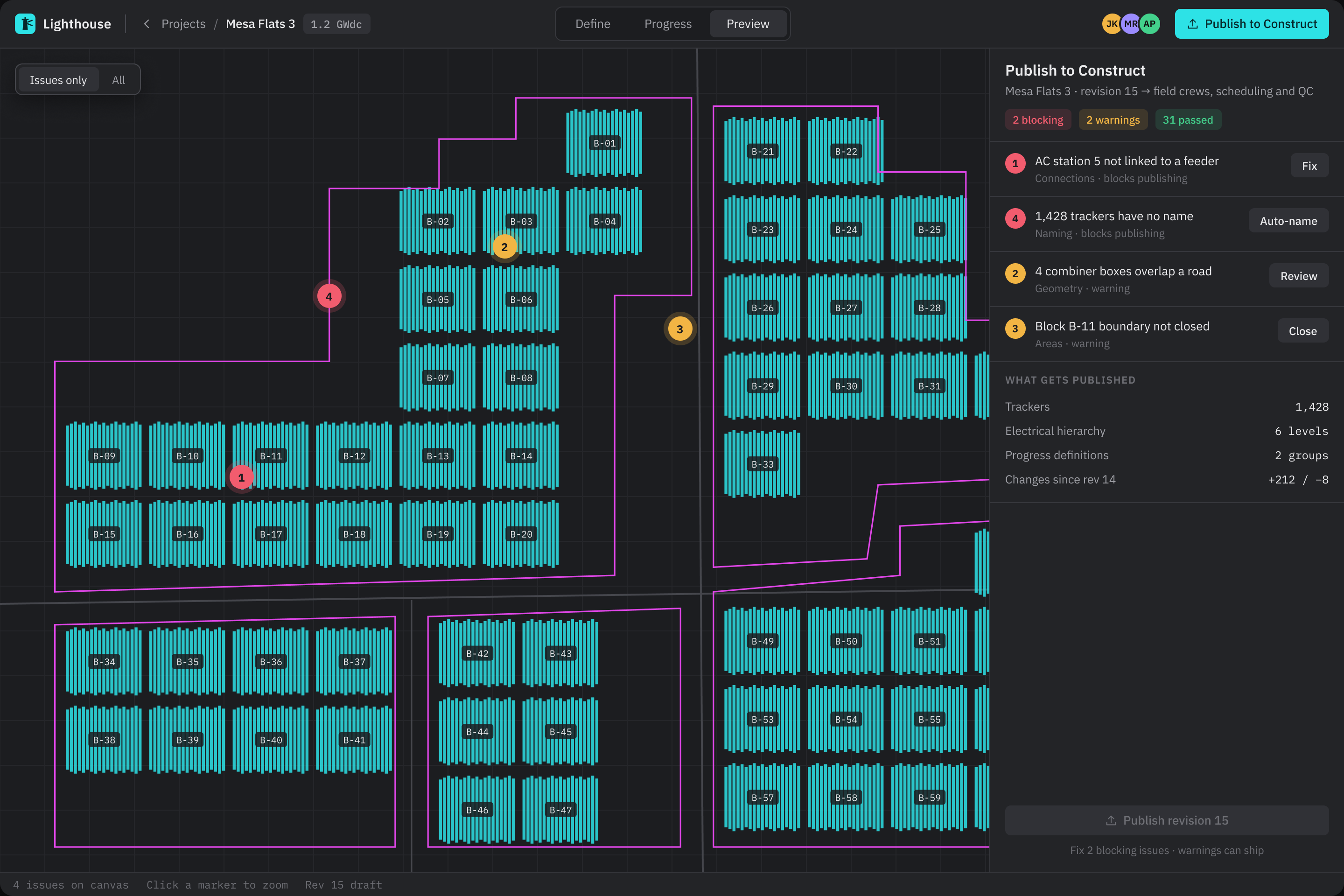
Left: publishing a revision to field crews, with blocking issues fixed first and every issue pinned on the canvas. Right: the progress definitions every number is calculated from.

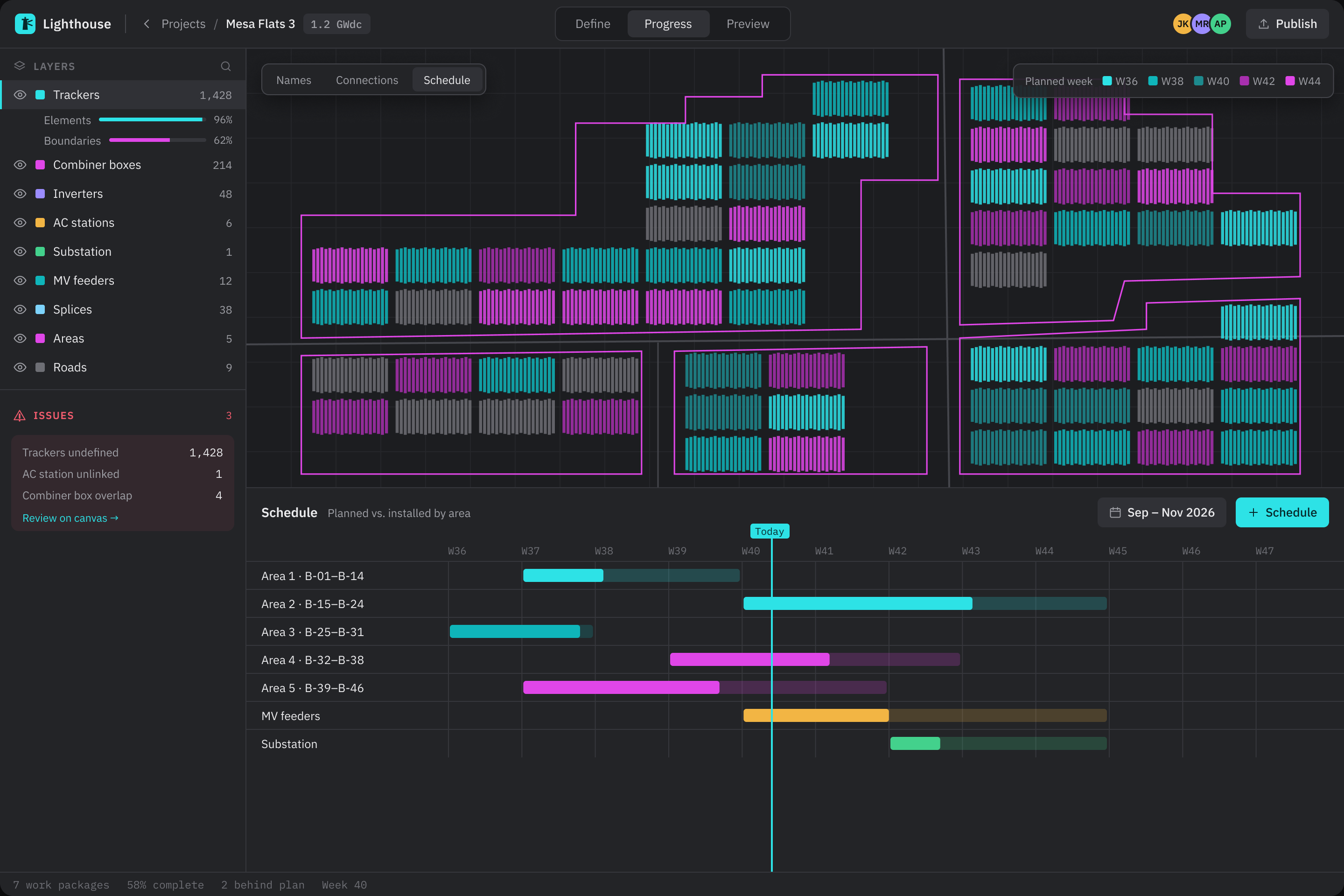
Planned vs. actual by area, with today marked, so delays show up weeks before anyone has to call.

Outcome

  • One source of truth instead of spreadsheets, static CAD exports and verbal updates.
  • No more weekly status calls. EPC leads moved to self-serve reviews, and the schedule view surfaced delays early.
  • Field and office aligned. Four roles on the same graph, with QC defects located on it automatically.

Screens redesigned in 2026 with sample data, so the work can be shown without client branding or real figures. The original product is under NDA.

Next project

Global media platform · Full NDAPublishing and review tools

One content model for a creator portal and two review tools

Three years embedded in the product team, designing the portal creators use to publish episodes and the internal tools reviewers use to check them. The structure follows the original work; names, artwork and people are replaced with fictional ones.

PublishingReview toolsmacOS · iOS

Redesign of the original work · original under NDA

ClientGlobal media platform (full NDA)
Duration3 years, embedded
PlatformmacOS, iOS
Delivered1 publishing portal, 2 review tools, 1 shared model
3 yearsembedded in the product team
2internal review tools, for cue sheets and artwork
1content model and status vocabulary shared by every tool

The problem

Creators submitted episodes through one tool and reviewers checked them in others. Each tool described the same content in its own words, so a rejected episode came back with a vague reason and the creator had to guess what to fix.

I brought the portal and both review tools onto one content model and one set of statuses, then redesigned each tool around the decision its user has to make.

For creators

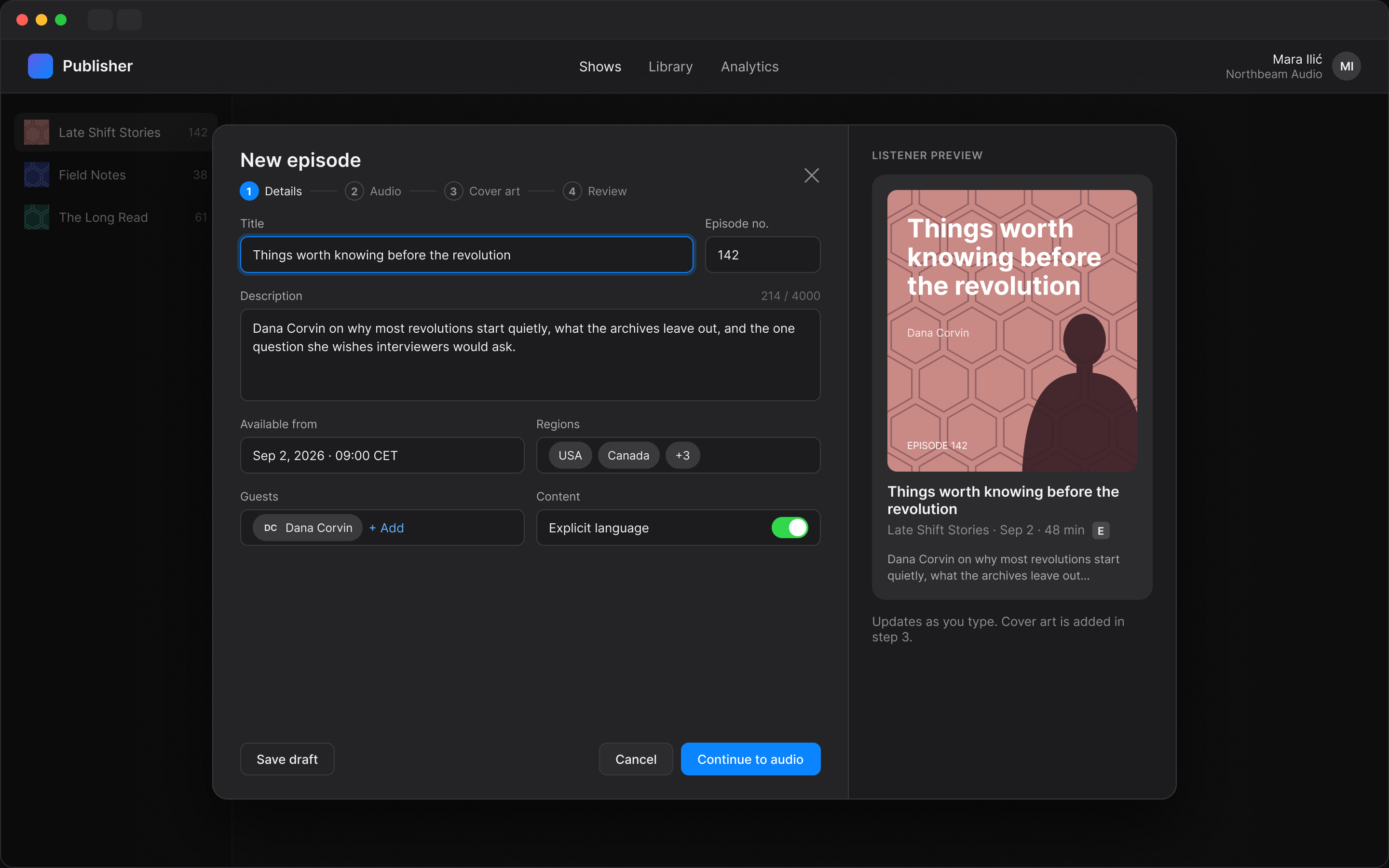
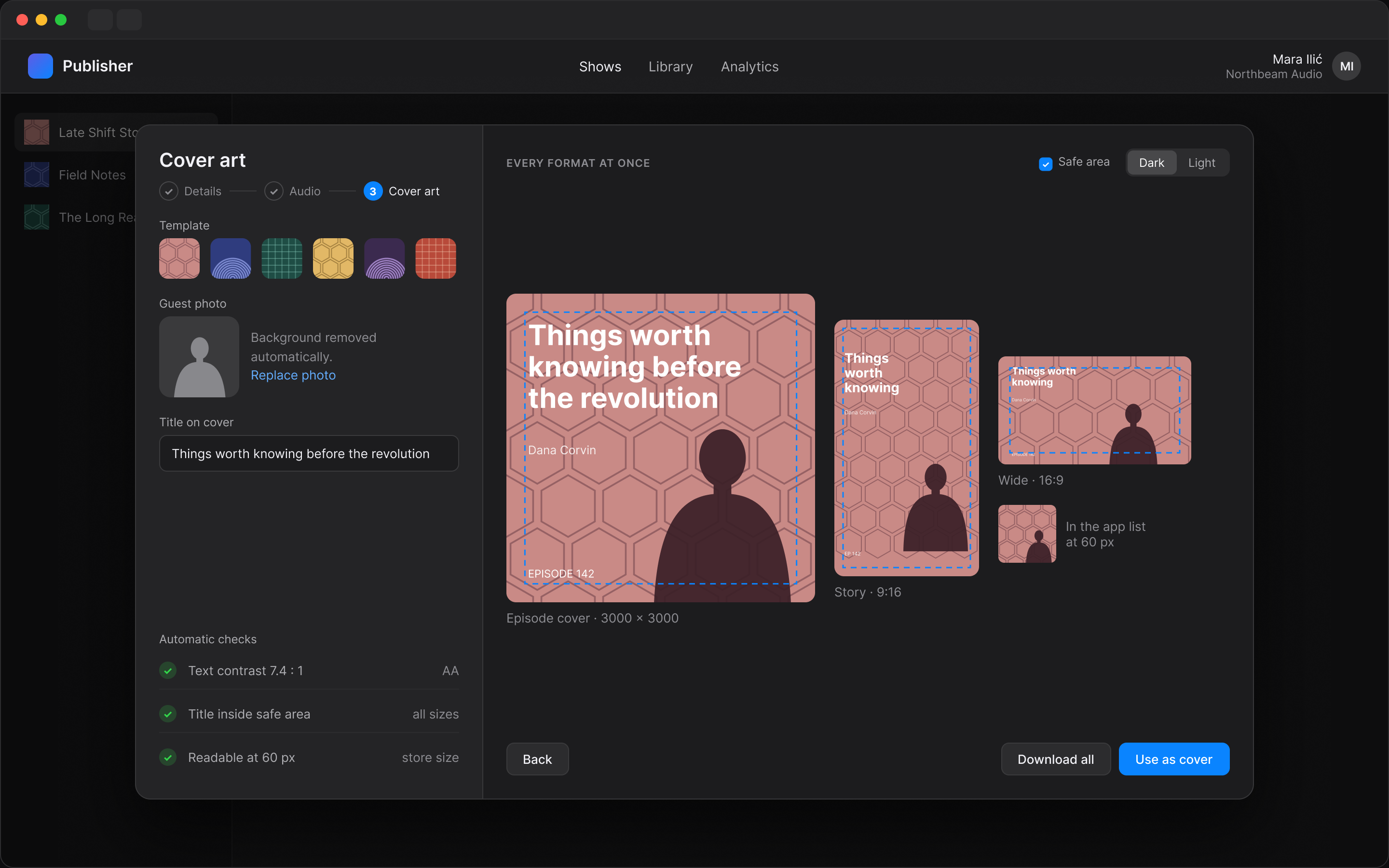
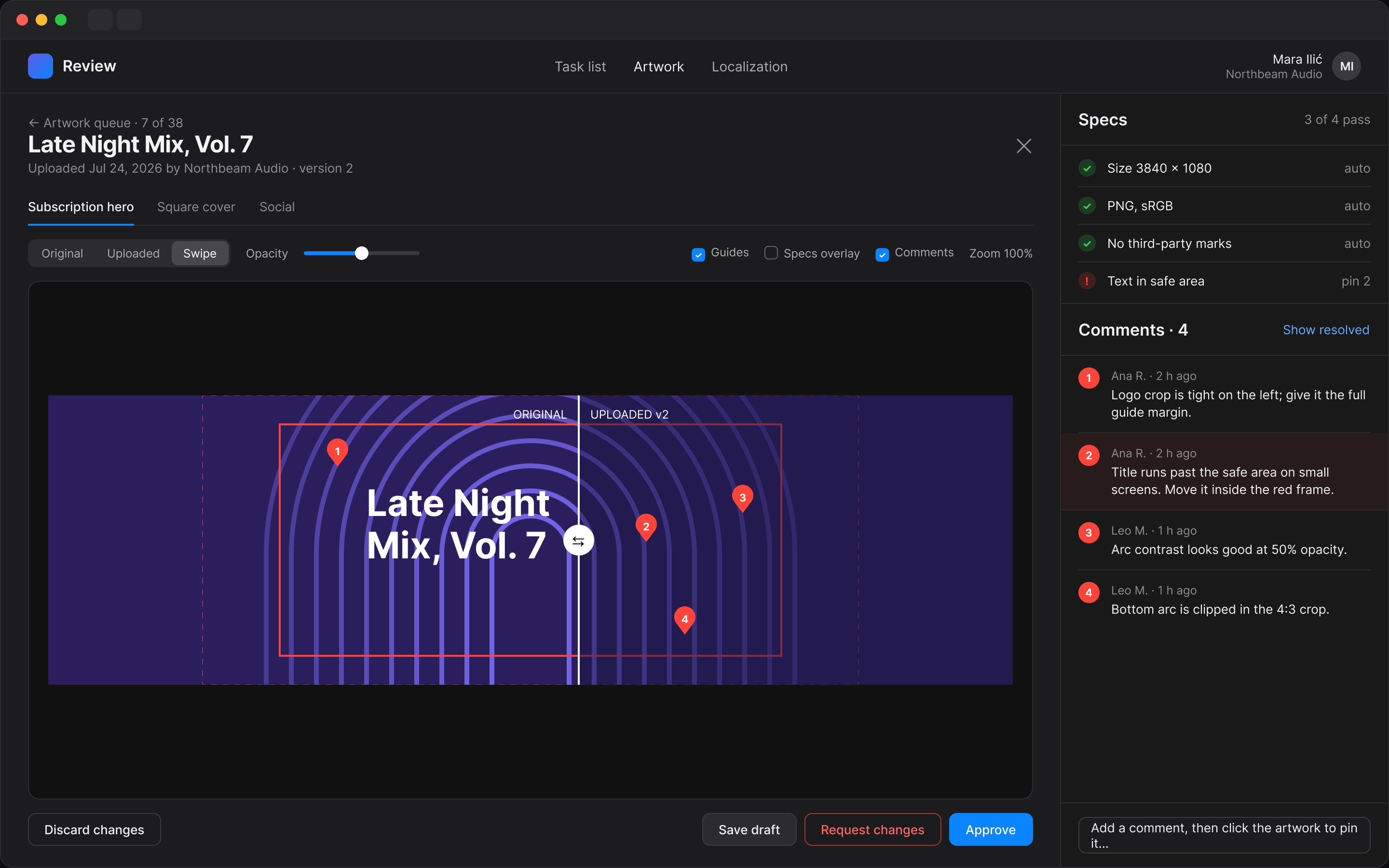
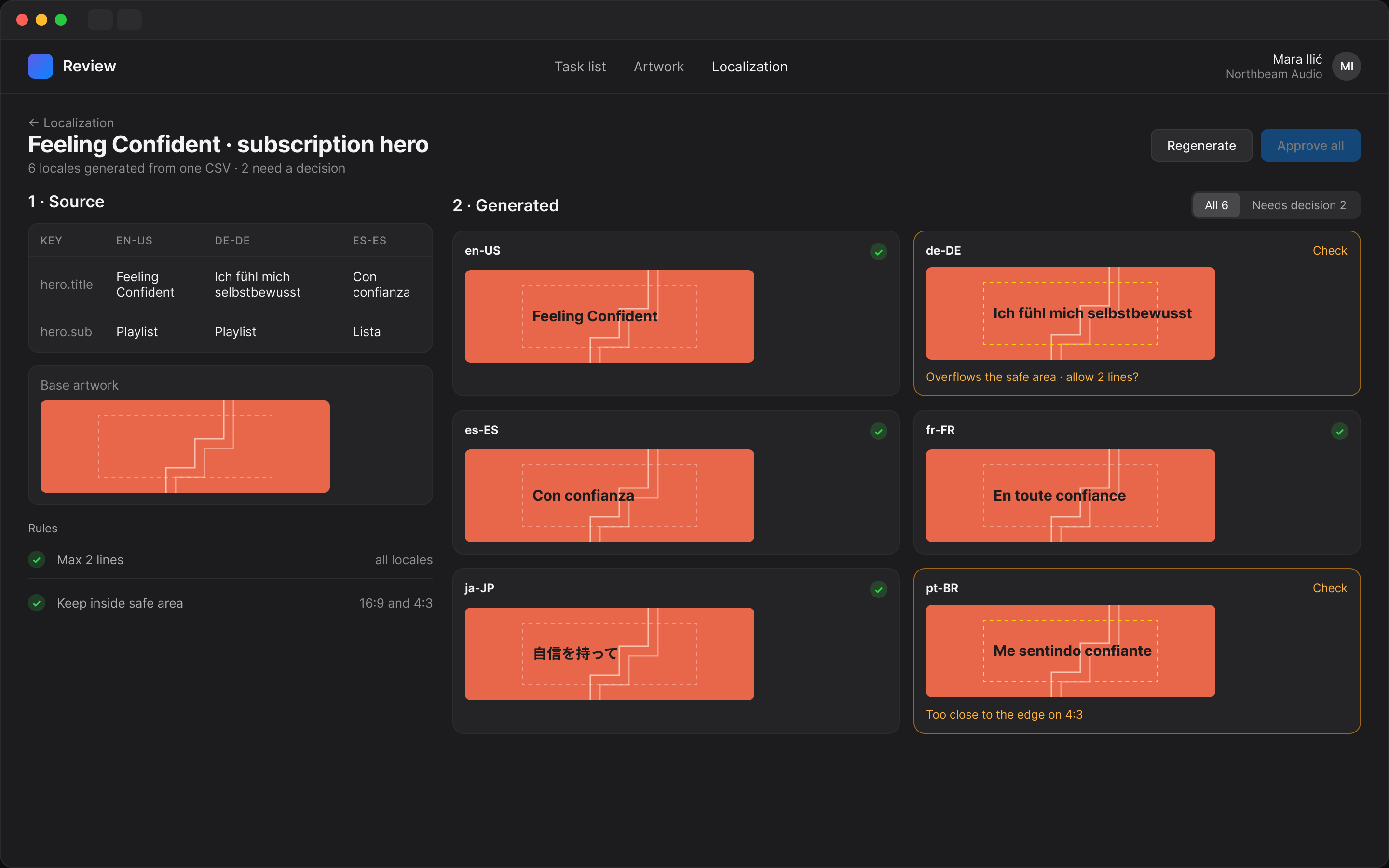
The episode list now says where every episode is in review and, when something needs fixing, exactly what and where. A new episode shows a live listener preview while you type, and cover art is generated for every format at once, with contrast and safe-area checks before anything is submitted.

For reviewers

Review moved from free-form judgement to clear decisions. Cue sheets put every cue on a waveform timeline with approve and deny on the keyboard, and progress gates the final approval. Artwork review uses swipe compare and numbered pins tied to comments, the pattern review tools like Frame.io made familiar, so every rejection points at a spot.

Cue sheet review: green approved, red flagged, grey still to check. The task can only be approved once every cue has a decision.

Left: artwork review with specs checked automatically and comments pinned to the image. Right: localized artwork generated from one CSV, with the locales that break the safe area flagged for a decision.

Redesigned in 2026 from the original structure. All names, artwork and people are fictional; the original product is under full NDA. I'm happy to walk through the real work in a private call.

Want the full story?

Next project · CrowdhouseOwning part of a Swiss apartment building, from your phone

Owning part of a Swiss apartment building, from your phone

Crowdhouse lets people buy shares of Swiss income properties together with other co-owners. I designed its mobile app at Kroon Studio. This is a redesign on today’s patterns: the original screens are no longer available, so everything here is rebuilt from scratch with sample data.

ProptechFintechMobile app

Redesign of earlier work · rebuilt with sample data

ClientCrowdhouse, Zurich
RoleProduct Designer, Kroon Studio
Redesign2026
PlatformMobile app
4steps from a listing to a co-owner vote
40shares per building, shown as a grid you pick from
1sample data set behind all six screens, so every figure adds up

The problem

Buying a share of a building is a large and unfamiliar decision. People know funds, where one number tells the story. Co-ownership comes with a building, a community of co-owners and decisions to make together.

The redesign starts from three questions a new co-owner asks:

  • Can I trust this property? Price, yield, occupancy and condition before any amount.
  • What do I actually own, and what does it pay? A share of a real building, and the rent that reaches me.
  • What happens after I buy? Payouts, documents and votes on the building.
Yield firstEvery listing leads with gross yield, price and the smallest share, then how much is already reserved.
Follow the rentOne bar splits the yearly rent into upkeep, interest, reserve and what reaches co-owners.
See the share2.5% is hard to picture. One cell out of forty is not.

Key decisions

The building, not a ticker

Each property is a place with an address, flats and a year of renovation. The illustration and facts come before any chart.

One set of numbers

The rent on the property page, the payout waterfall and the portfolio all come from the same sample building, so a co-owner can check one against the other.

Votes are part of owning

A co-owner vote gets its own screen: the question, the cost, live results against the two-thirds rule, and the documents behind it.

What you ownValue of the shares, rent paid out each quarter and each property you co-own.
Decide togetherResults update as co-owners vote, with the two-thirds line drawn on the turnout bar.
Every payout explainedFrom your 5% of the rent down to the net amount, with a tax statement one tap away.

What I’d test next

This is a redesign, so there are no new results to report. With co-owners, I would test:

  • The share grid. Does one cell out of forty make 2.5% easier to understand than the percentage alone?
  • The rent split and the waterfall. Can people explain, in their own words, why their payout is smaller than their share of the rent?
  • Voting in the app. Does turnout on building decisions change when the vote, its cost and its documents sit on one screen?

A redesign of my earlier work for Crowdhouse at Kroon Studio. The property, people and figures are sample data, not Crowdhouse data, and the building photos are AI-generated images of places that don’t exist.

Next project

Next project · Self-initiated conceptA banking app and its design system

A banking app, and the design system that switches it to dark

Orvia is a self-initiated concept: a personal banking web app built from one Figma library, where Light and Dark come from variable modes instead of a second set of screens. The visual direction comes from the best-rated banking work on Dribbble, the structure from Untitled UI.

FintechDesign systemWeb · mobile

Self-initiated concept · fictional bank, sample data

ClientSelf-initiated (fictional bank)
RoleProduct designer, research to library
Year2026
PlatformWeb, mobile
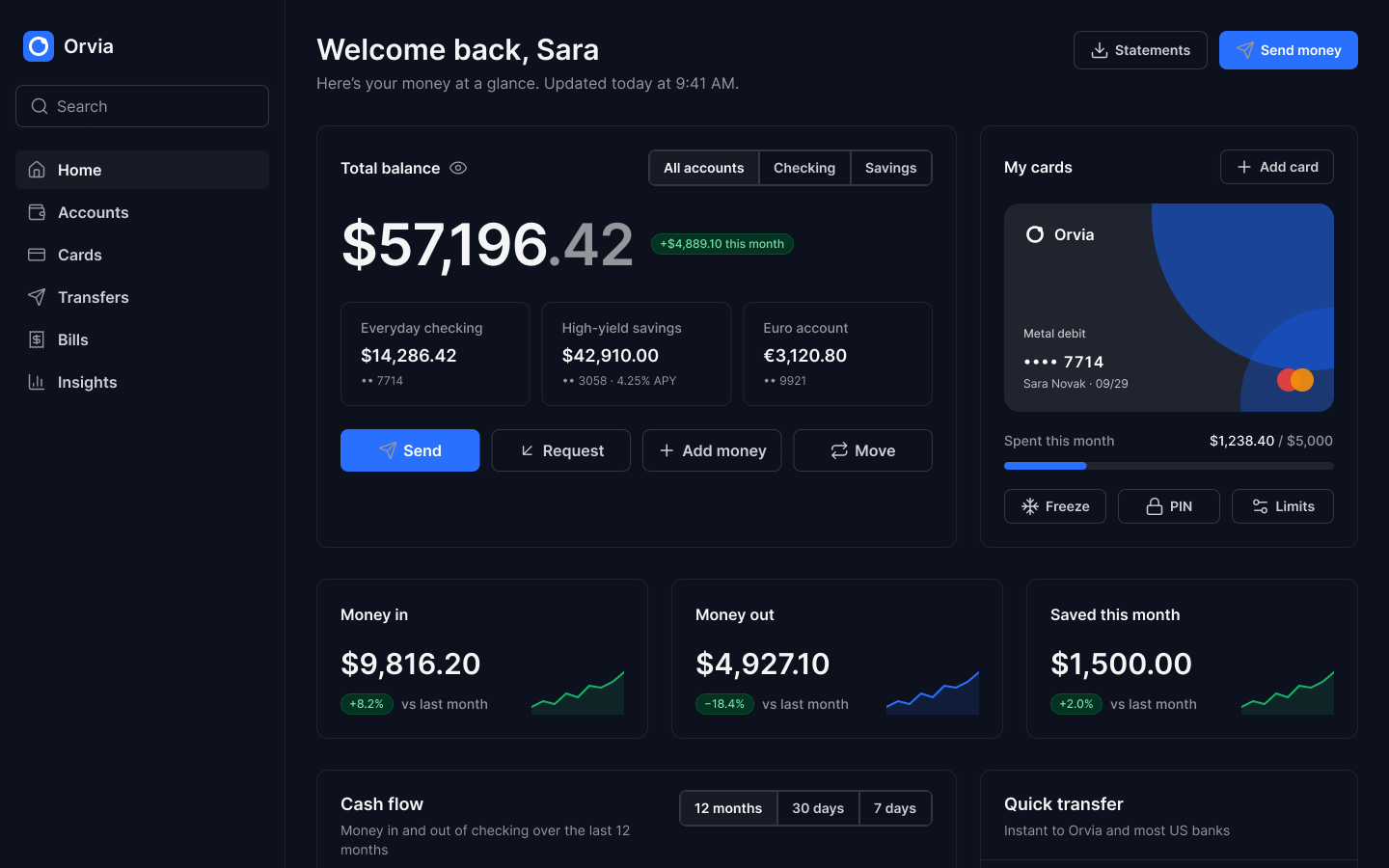
Orvia home: total balance with accounts and actions, the metal debit card, three metric cards and the top of the cash flow chart
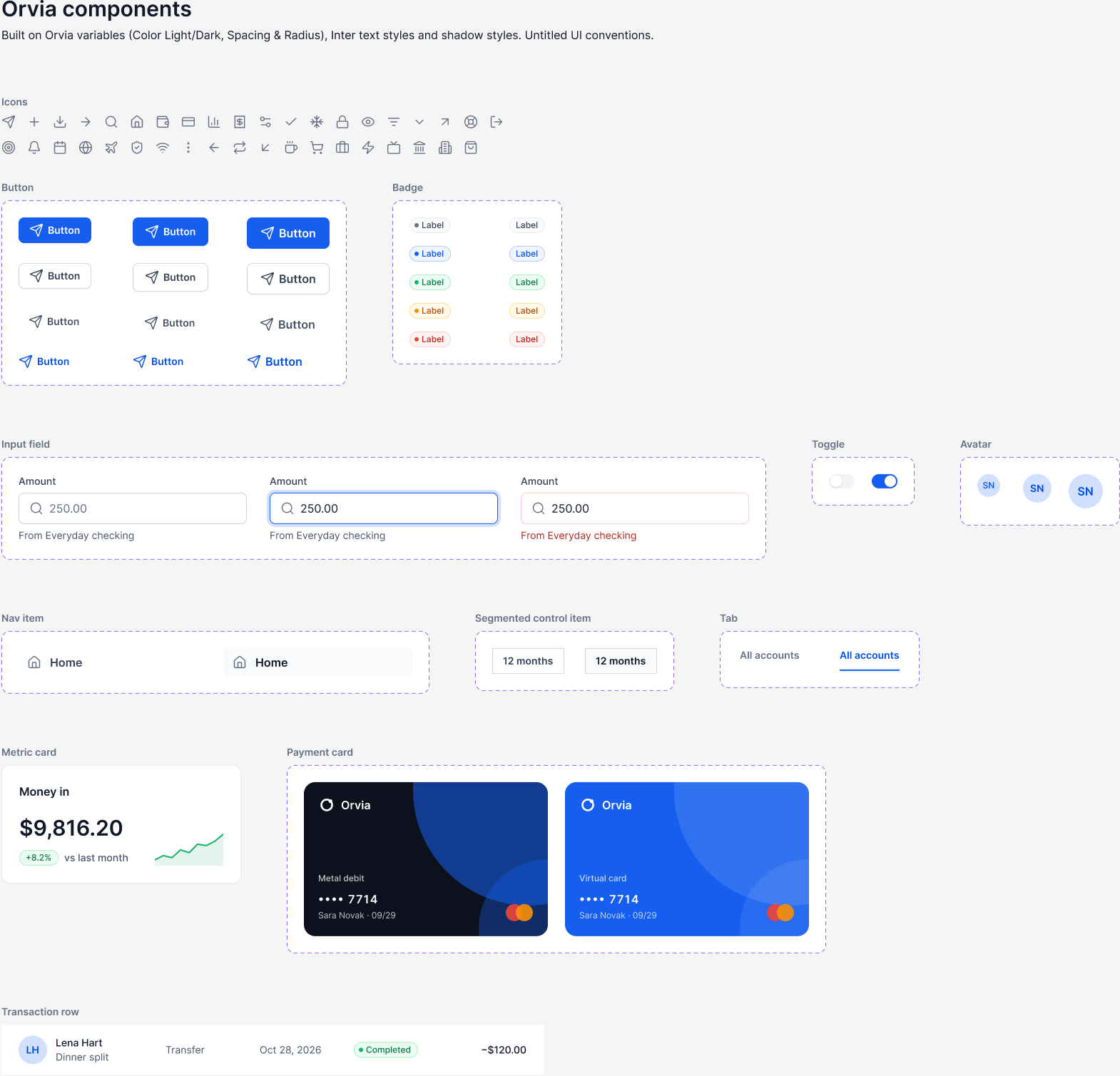
11components with variants and properties
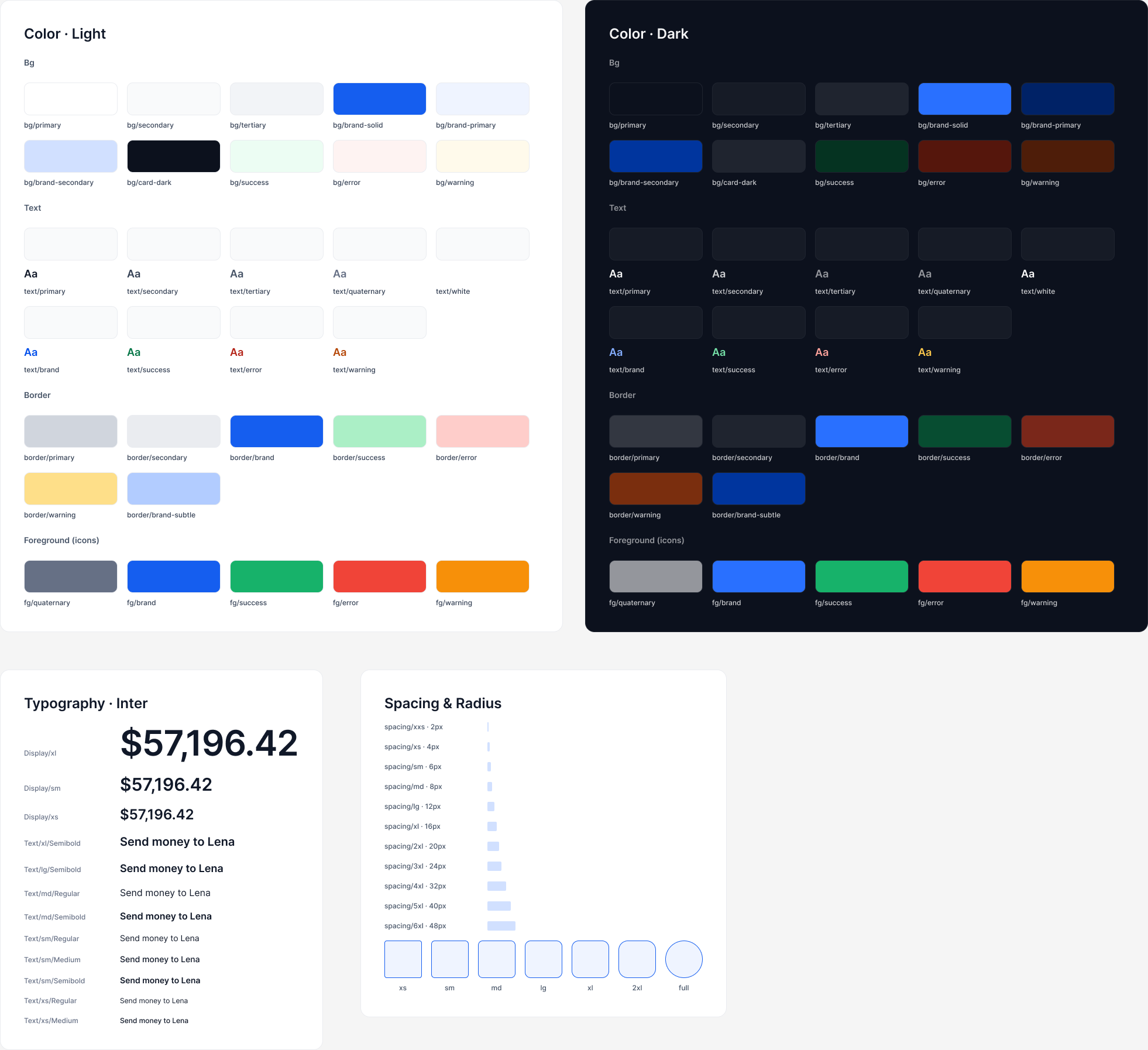
31semantic colour tokens, each with a Light and a Dark value
390+component instances across seven screens, no detached layers

The problem

The most-viewed banking dashboards on Dribbble share a strong visual language, but they are single images. They rarely show states, dark mode, or the components a team would need to build them.

I set myself the brief of keeping the ambition of those shots in screens that hold up as a system:

  • Money at a glance. The balance comes first, then each account and four actions.
  • One primary action per view, so the next step is never ambiguous.
  • Trust in the flow. Masked numbers, a review step before money moves, and a plain warning about scam requests.
  • Dark mode as a mode, not a redraw.

Research

I went through the top banking dashboards on Dribbble and listed what they do well: a large balance with the cents muted, a physical card front and centre, a bar chart with the current month highlighted, quick transfers to familiar faces, and KPI cards with sparklines.

Then I rebuilt those moves on Untitled UI conventions: neutral grays, bordered cards, pill badges and a clear button hierarchy, so the result reads as a product, not a poster.

Foundations: semantic colours in Light and Dark mode, Inter type scale, spacing and radius scales
Foundations: 56 primitives, 31 semantic colours aliased to them in Light and Dark, Inter text styles, and spacing and radius scales bound straight to layout. Every variable carries its CSS name.

Key decisions

Tokens before screens

Primitives, then semantic aliases, then components, and only then screens. Screens use component instances and variable-bound frames, nothing else.

Status in words, not just colour

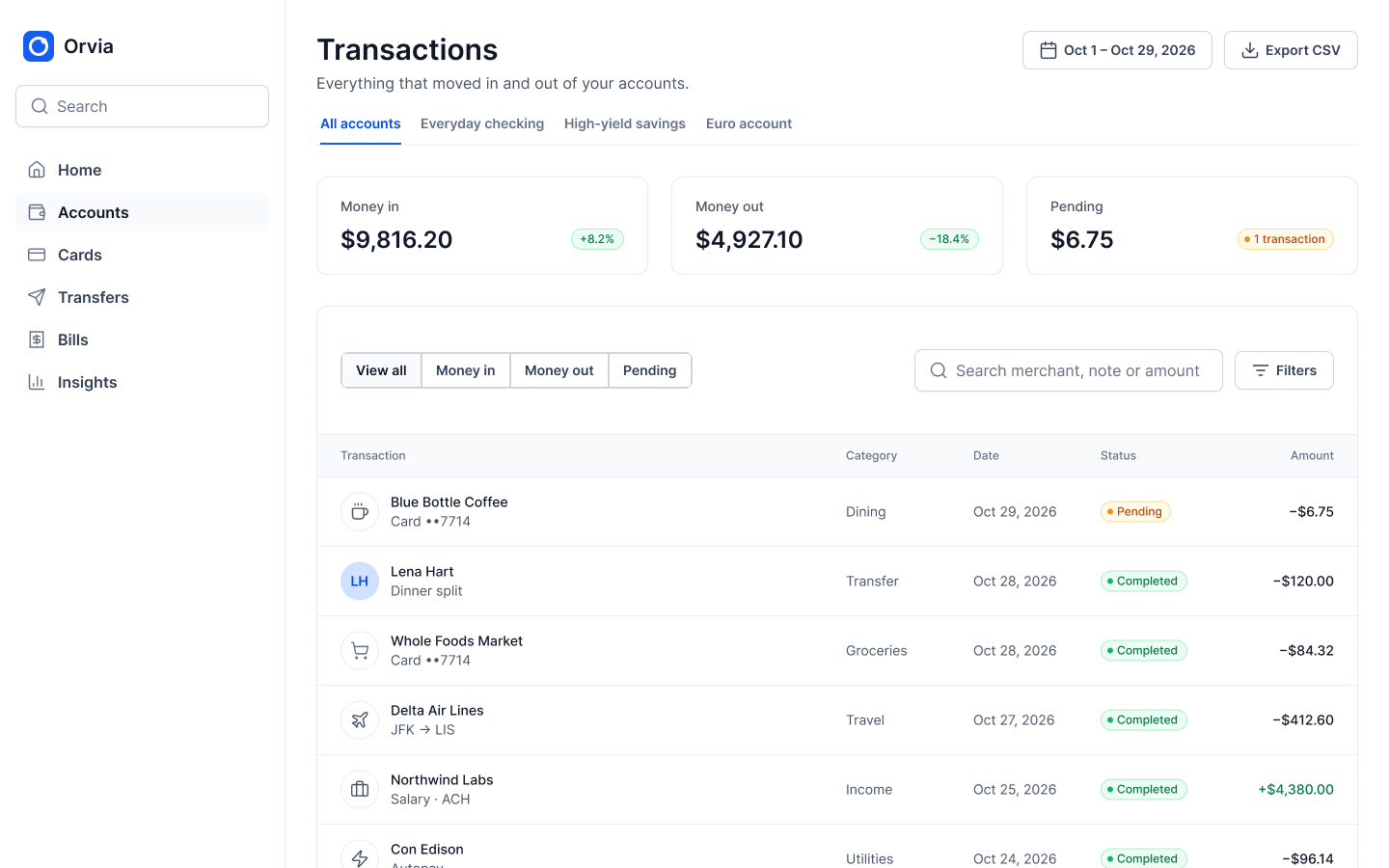
Pending, completed and declined are badges with a dot and a label. Declined amounts are struck through and greyed out.

Check the system mechanically

Dark versions are the Light frames with the Color collection switched to Dark. An audit of every fill found one fixed colour: the white mark in the logo, on purpose.

Component library: buttons, badges, inputs, toggle, avatars, navigation, segmented control, tabs, metric card, payment cards and transaction row
The library: buttons in four hierarchies and three sizes with a swappable icon, five badge colours, inputs with focus and error states, and a transaction row that shows either an avatar or a merchant icon.
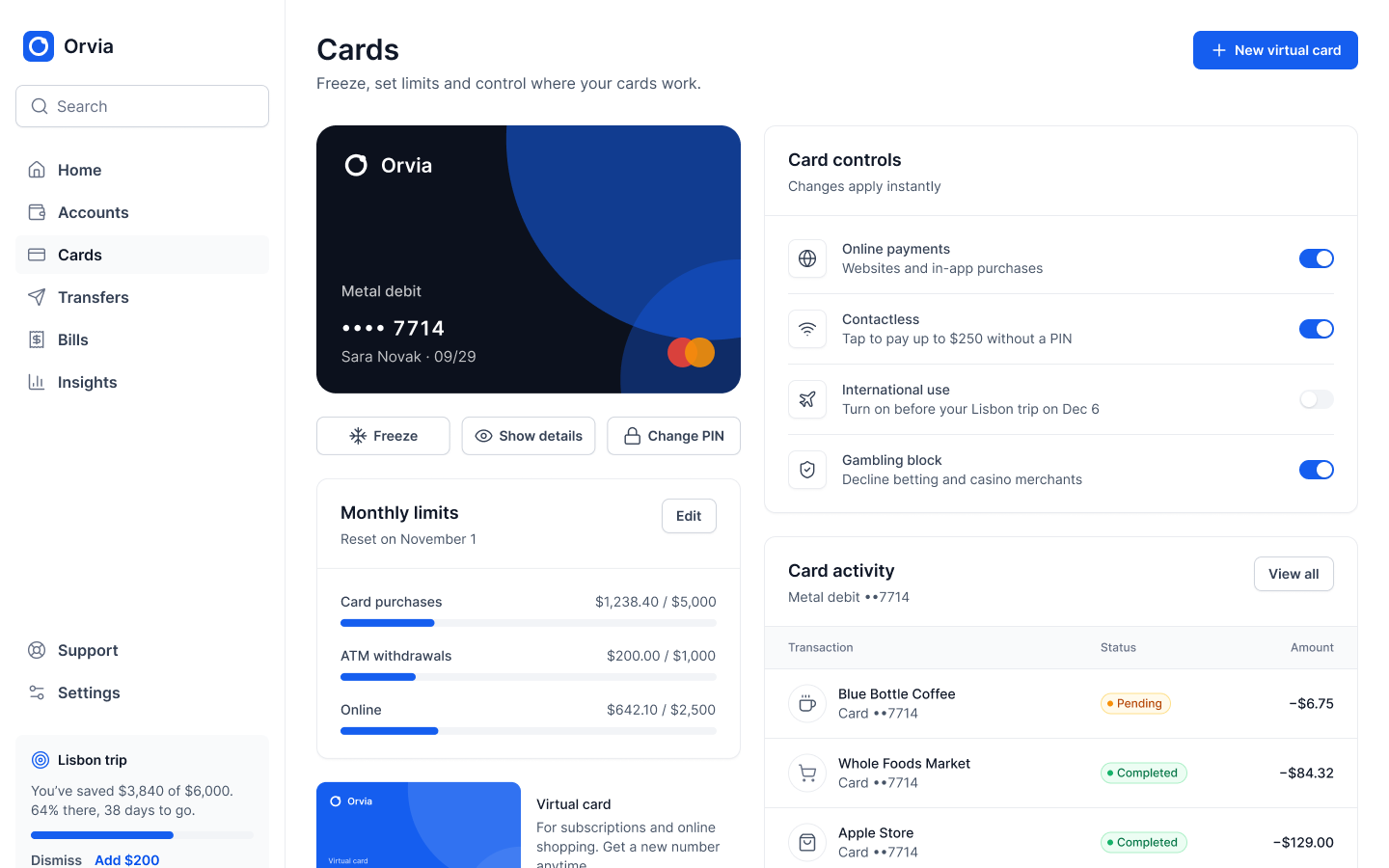
Transactions: account tabs, money in and out totals, filters and the full transaction table Cards: the metal card with freeze, details and PIN, monthly limits and instant card controls

Left: transactions with merchant icons for businesses and initials for people. Right: card controls that apply instantly, with limits and card-only activity next to them.

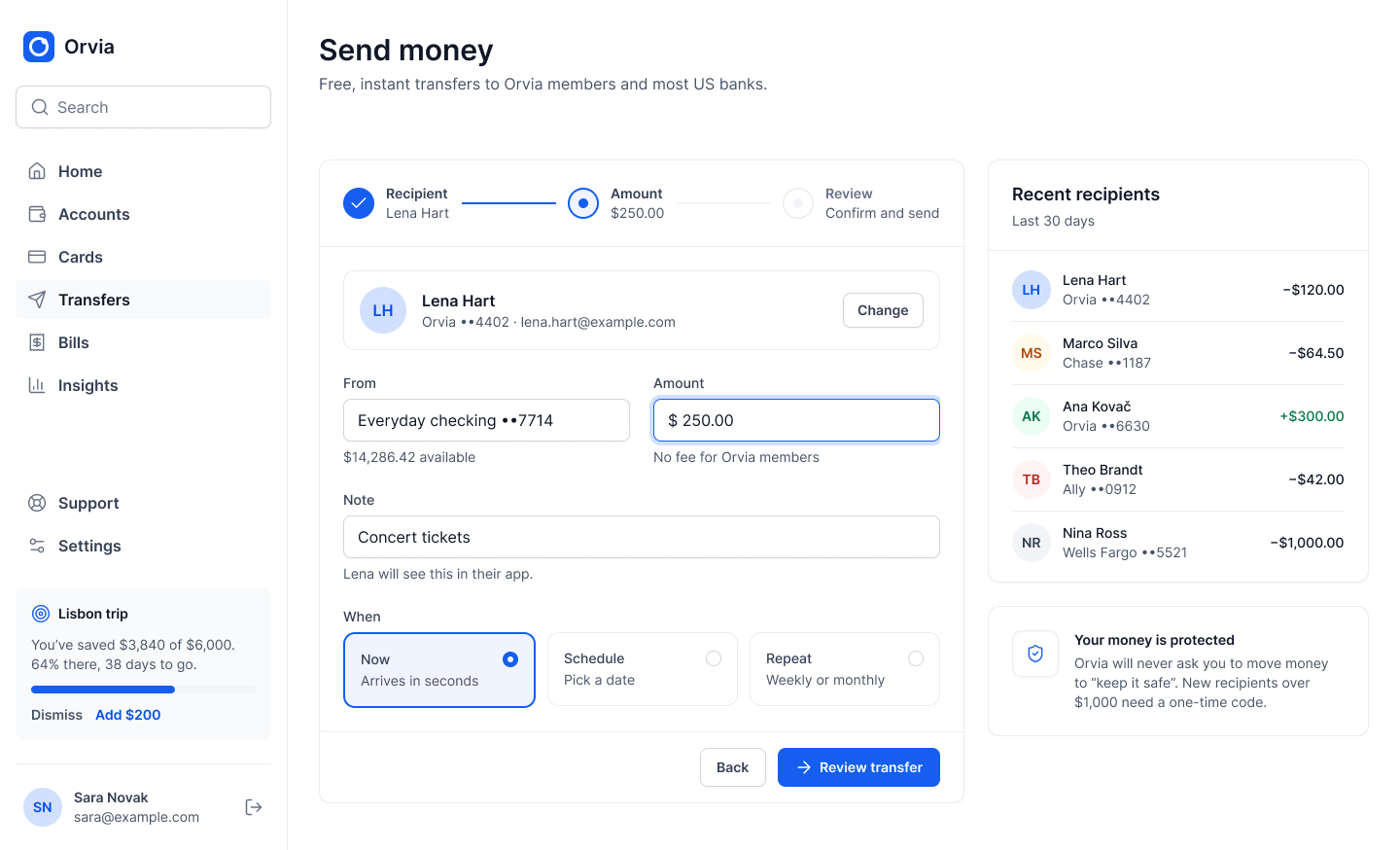
Send money: three-step flow with recipient, amount, note and timing, recent recipients and a protection note
Send money in three steps, with the available balance under the field, a note the recipient sees, and a plain explanation of how payments are protected.
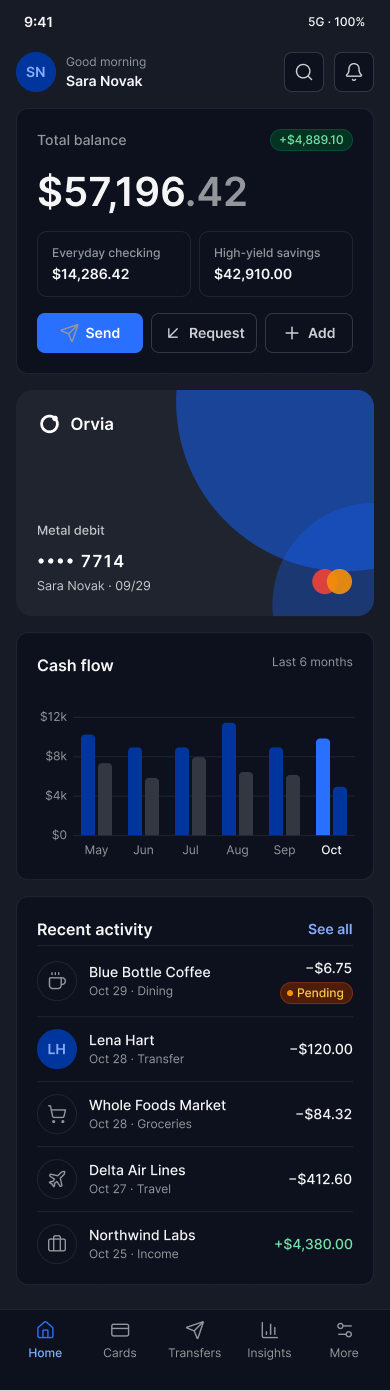
The same home screen in Dark mode
The same frame as the Light home screen, with one change: the Color collection set to Dark.
Mobile home in Light mode Mobile home in Dark mode
At 390px the same tokens and components stack into one column, with a tab bar in place of the sidebar.

Outcome

  • One source, two themes. Light and Dark come from the same frames through 31 semantic tokens.
  • Built only from the library. Over 390 instances across seven screens, ready to change in one place.
  • Ready for code. Every variable has its CSS name and every component a usage description.

A self-initiated concept, not client work. Orvia is a fictional bank and every name and figure is sample data. I’m happy to share the Figma file with variables, components and screens.

Next project

Next project · Siemens GamesaShowing wind operators where energy is lost